This lease commencement calendar is an Excel workbook for coordinating start dates, possession dates, preparation deadlines, assigned staff, and statuses for long-term residential rentals.
Property-management teams can enter up to 100 lease records, monitor calculated scheduling alerts, and use the summary to track upcoming activity by planning window, status, and month. The included records and staff names are fictional examples that can be replaced.
How this workbook can help
- Keeps lease commencement dates, possession dates, preparation deadlines, assignments, and coordination notes together.
- Helps staff prioritize upcoming starts and overdue preparation work from a configurable as-of date.
- Makes missing information and incorrect date sequences easier to identify through calculated calendar alerts.
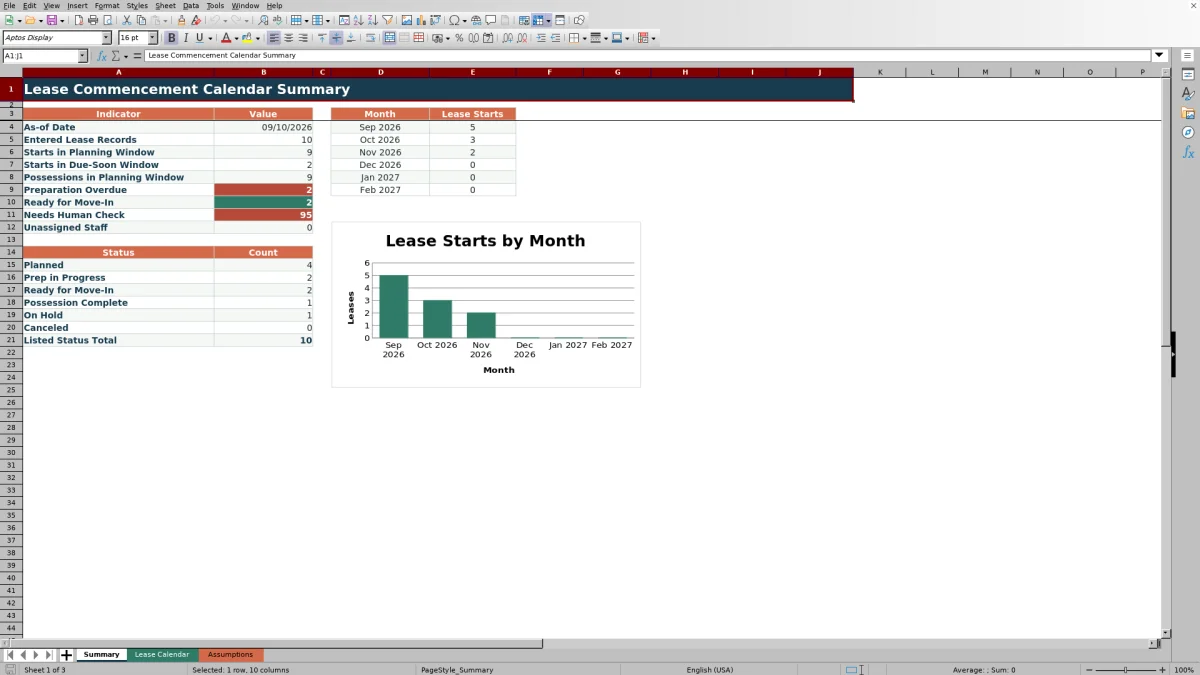
- Provides summary counts and a six-month chart for understanding scheduled lease-start volume.
What is in the file
How to get started
1. Configure the planning settings
Open the Assumptions sheet and update the as-of date, upcoming window, due-soon threshold, earliest accepted date, and latest accepted date.
2. Update staff and status choices
Replace the fictional staff names with the people responsible for lease coordination. Confirm the six status choices and whether each one is closed for scheduling.
3. Enter lease commencement records
On the Lease Calendar sheet, enter the property, unit, tenancy, lease start date, possession date, preparation due date, coordination description, assigned staff, and status. Use the supplied dropdowns where available.
4. Act on alerts and summary results
Check Days to Start and Calendar Alert for each record. Then use the Summary sheet to monitor upcoming starts, possession activity, overdue preparation, unassigned records, status counts, and monthly lease-start volume.
Coordinate Upcoming Lease Commencements
The workbook places property, unit, tenancy, key dates, coordination notes, assigned staff, status, and calculated scheduling information in one schedule. This structure helps a property-management team see which rental homes are approaching lease commencement and who owns each coordination task.
The Summary sheet counts entered records, starts within configurable windows, possessions within the planning window, overdue preparation deadlines, ready-for-move-in records, unassigned records, and records with calendar alerts requiring attention.
Use Date and Alert Logic
The as-of date drives Days to Start, planning-window counts, and overdue calculations. The Lease Calendar uses date-driven alerts to identify a missing property, missing required dates, a possession date after the lease start date, a preparation date after possession, or an empty staff assignment.
Date validation applies to the lease start, possession, and preparation columns using the earliest and latest accepted dates on the Assumptions sheet. Staff and status dropdowns draw from the configured lists on that sheet.
Worked Fictional Lease Scenario
Input: Cedar Court, Unit 101 is a fictional record with an as-of date of September 10, 2026, a lease start and possession date of September 15, a preparation due date of September 12, an assigned staff member, and Ready for Move-In status.
Result: Days to Start calculates five days to start. The record contributes to the September lease-start total and the Ready for Move-In status count because it is not canceled.
Interpretation: The lease is scheduled for the current summary month, its dates follow the expected preparation-to-possession-to-start sequence, and its status indicates move-in readiness. Next decision: confirm the key packet and move-in appointment described in the coordination field, then update the status when possession is complete.
Common Errors and Solutions
When an alert appears, correct the source fields rather than overwriting the formula columns.
- Check property: enter the property for the lease record.
- Check missing date: complete the lease start, possession, and preparation due dates.
- Check possession date: change a possession date that falls after the lease start date.
- Check prep date: change a preparation deadline that falls after possession.
- Assign staff: choose a coordinator from the staff dropdown.
If a date is rejected during entry, compare it with the earliest and latest accepted dates on the Assumptions sheet.
Manage Status and Staff Assignments
A controlled status list keeps scheduling categories consistent across the calendar and summary. The supplied statuses are Planned, Prep in Progress, Ready for Move-In, Possession Complete, On Hold, and Canceled.
Possession Complete and Canceled are configured as closed for scheduling. Canceled records are excluded from applicable lease-start, planning-window, possession, and overdue-preparation summary calculations. Assigned Staff is also controlled by a configurable list, while blank assignments are counted on the Summary sheet.
Workbook and blank spreadsheet comparison
Use the prepared workbook when its verified fields and calculations fit the task. Start with a blank spreadsheet when you need to design a different model and can build and test every field and formula yourself.
| Method | Setup | Calculations and review | Practical fit |
|---|---|---|---|
| This Excel workbook | Use the prepared structure in the validated file | Review the documented calculations and results | Local editable workflow supported by the workbook |
| Blank spreadsheet | Create the structure yourself | Build and test every formula and check | A custom model built from scratch |
Workbook Limits and Boundaries
The supplied calendar is designed for 100 lease records, covering rows 4 through 103. Its formulas, validation ranges, summary calculations, and structured table use that range, so expanding capacity requires corresponding range updates.
The monthly summary covers six consecutive months beginning with the month of the as-of date. Calendar syncing, email reminders, tenant messaging, document storage, and rent calculations are not included. The workbook is a coordination tracker, so source lease information and operational procedures remain outside its scope.
Frequently asked questions
What information does the lease commencement calendar track?
It tracks the property, unit, tenancy, lease start date, possession date, preparation due date, coordination description, assigned staff, status, calculated days to start, and calendar alert.
How many lease records can I enter?
The supplied Lease Calendar contains 100 entry rows, from row 4 through row 103. Expanding it requires updating the related formulas, validation ranges, summary ranges, and table range.
Which statuses are included?
The configured statuses are Planned, Prep in Progress, Ready for Move-In, Possession Complete, On Hold, and Canceled. The Assumptions sheet also identifies whether each status is closed for scheduling.
How are invalid or incomplete entries identified?
The Calendar Alert formula checks for a missing property, missing required dates, incorrect date order, an unassigned staff member, and scheduling conditions tied to status and timing. Date validation also limits entries to the accepted range configured on the Assumptions sheet.
Does the workbook send calendar invitations or reminders?
No. Alerts and schedule indicators appear inside the Excel workbook. External calendar invitations, email reminders, and application syncing are not included.
Editorial responsibility

Marcus ReedLeasing and property workflows

Elena BrooksWorkbook logic and financial operations