
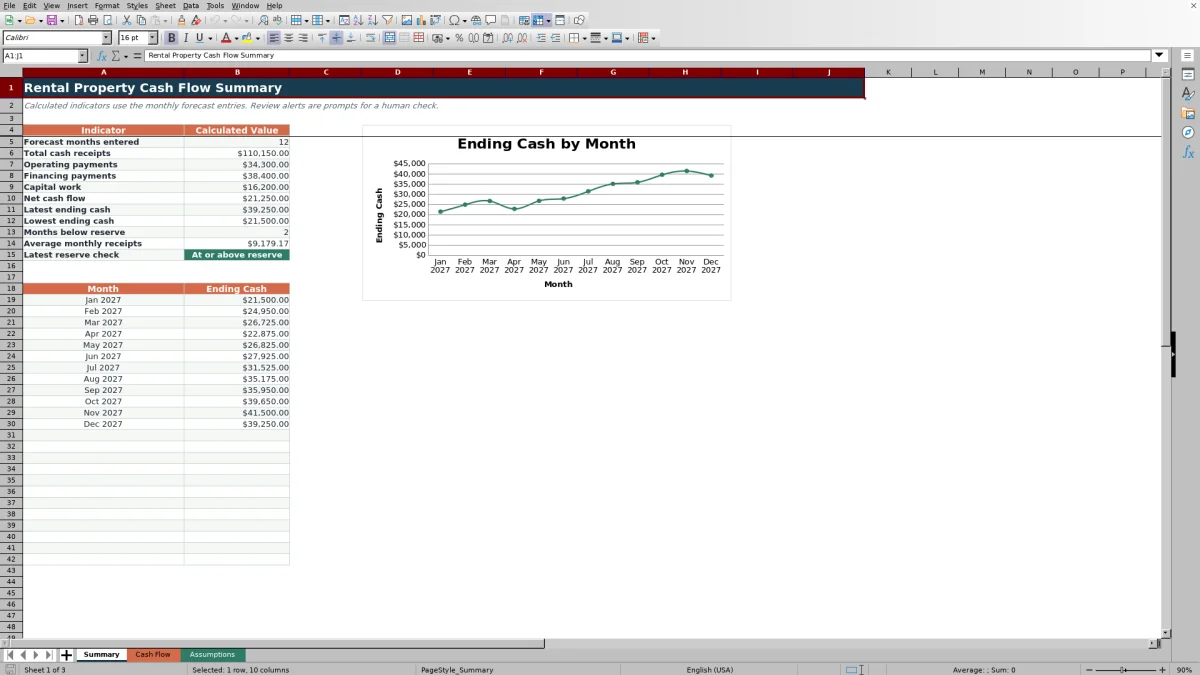
This rental property cash flow spreadsheet is an Excel workbook for forecasting monthly rent receipts, other receipts, operating payments, financing payments, capital work, and ending cash for long-term residential rentals.
The workbook provides 120 monthly input rows, formula-driven cash balances, reserve-status alerts, summary indicators, and an ending-cash chart. Fictional Juniper Court entries demonstrate the workflow and can be replaced with property-specific assumptions.
How this workbook can help
- Shows whether planned receipts cover operating, financing, and capital payments each month.
- Carries the cash balance forward through monthly forecast rows entered in chronological order.
- Identifies forecast months when ending cash is below the reserve assumption.
- Combines monthly operating detail with summary totals and an ending-cash trend.
What is in the file
How to get started
1. Set the cash assumptions
Open the Assumptions sheet and enter opening cash and the reserve amount used by the status formulas. Update the property, unit, and tenancy choices for the rentals being forecast.
2. Enter the monthly forecast
On the Cash Flow sheet, enter one month per row in chronological order. Add the property, unit, tenancy status, and a short description for each period.
3. Add receipts and payments
Enter rental receipts, other receipts, operating payments, financing payments, and capital work as nonnegative amounts. The workbook subtracts the payment categories when calculating net cash flow.
4. Check cash balances and status
Read the calculated net cash flow, beginning cash, ending cash, and reserve status for each month. Use the Summary sheet to check totals, the lowest ending cash, months below reserve, and the ending-cash chart.
Monthly Rental Cash Planning in One Workbook
The Cash Flow sheet organizes each monthly cash plan by month, property, unit, tenancy status, and description. Separate columns distinguish rental receipts and other receipts from operating payments, financing payments, and capital work.
Net cash flow equals the two receipt categories minus the three payment categories. Beginning and ending cash then show how each monthly result changes the available cash balance.
Assumptions and Controlled Data Entry
The Assumptions sheet holds opening cash, the reserve input, and the lists used for property, unit, and tenancy selections. The Cash Flow sheet also validates forecast dates and cash entries.
Receipts and payments should be entered as nonnegative amounts. Payment columns are already subtracted by the net cash flow formula, so entering a payment as a negative number would reverse its intended effect.
Worked Scenario for a Fictional Rental Property
Consider the fictional entries in the workbook. Opening cash is $18,000 and the minimum cash reserve is $24,000. January includes $9,200 of rental receipts, $150 of other receipts, $2,650 of operating payments, $3,200 of financing payments, and no capital work.
- Input: January receipts total $9,350, while payments total $5,850.
- Result: The formula produces $3,500 January net cash flow and ending cash of $21,500.
- Interpretation: Ending cash is positive but below the fictional $24,000 reserve, so the status is Review reserve.
- Next decision: Review the timing of receipts and planned payments, then continue the chronological monthly forecast.
February adds $3,450 of net cash flow and raises ending cash to $24,950, which reaches At or above reserve. March adds $1,775 and raises ending cash to $26,725. These fictional results show how each monthly row carries into the next balance; they are not a forecast of investment performance.
Summary Indicators and Reserve Status
The Summary sheet totals cash receipts, operating payments, financing payments, capital work, and net cash flow across entered forecast rows. It also reports the latest ending cash, lowest ending cash, average monthly receipts, and the number of months below reserve.
The reserve setting does not change cash flow. It provides a threshold for classifying each ending balance as Review reserve or At or above reserve, while missing required numeric inputs produce Review inputs.
Common Errors and Solutions
- Entering payments as negative values: Replace them with positive amounts because the formulas subtract payment columns automatically.
- Entering months out of sequence: Restore chronological order because each beginning balance depends on cumulative net cash flow from earlier rows.
- Overwriting calculated columns: Restore formulas in Net Cash Flow, Beginning Cash, Ending Cash, and Review Status rather than typing results into those cells.
- Leaving the month blank: Enter a valid forecast month because row-level cash calculations remain blank when the month cell is empty.
- Assuming unit and property choices are linked: Confirm that each selected unit belongs to the selected property because the lists do not enforce that relationship.
Workbook Limits
The workbook has clear planning boundaries. It forecasts cash but does not import bank transactions, maintain a loan amortization schedule, or calculate investment measures such as capitalization rate, cash-on-cash return, internal rate of return, or net present value.
All entered rows feed one continuous cash-balance sequence. When rows for multiple properties are included, the resulting ending cash reflects the combined sequence rather than separate property-level cash accounts.
Comparison: Prepared Cash Flow Workbook vs. Blank Spreadsheet
A prepared cash flow workbook and a blank spreadsheet support different needs. This Excel workbook is suitable when its verified monthly fields, formulas, reserve check, and combined cash sequence fit the task. A blank spreadsheet is suitable when the user needs a different model and can design and test every field, formula, and control.
| Method | Setup | Calculations and review | Practical fit |
|---|---|---|---|
| This Excel workbook | Use the prepared 120-row monthly structure | Review the documented net cash, carried balances, and reserve results | A local forecast with one continuous cash sequence |
| Blank spreadsheet | Create the structure and controls yourself | Build and test every formula and check | A custom model when the prepared scope does not fit |
Neither method imports bank transactions or provides a live multiuser property-management system by itself. Choose based on the required workflow and verify calculations after adapting the file.
Frequently asked questions
What does the rental property cash flow spreadsheet calculate?
It calculates monthly net cash flow, beginning cash, ending cash, and reserve status. The Summary sheet also totals receipts and payment categories and reports cash-balance indicators.
How many monthly forecast rows are available?
The Cash Flow sheet provides 120 monthly input rows, covering rows 4 through 123.
Should rental property expenses be entered as negative numbers?
No. Enter operating payments, financing payments, and capital work as nonnegative amounts. The net cash flow formula subtracts those columns automatically.
How does the reserve status work?
The workbook compares each month's ending cash with the reserve assumption. It displays Review reserve below the threshold, At or above reserve when the threshold is met, and Review inputs when required numeric values are unavailable.
Can the workbook include more than one property or unit?
Yes. Each row includes validated property and unit selections that can be updated on the Assumptions sheet. However, all completed rows contribute to one continuous cash-balance sequence rather than separate balances for each property.
Editorial responsibility

Marcus ReedLeasing and property workflows

Elena BrooksWorkbook logic and financial operations