This Excel workbook provides a structured security deposit intake ledger for long-term residential rental operations. It records required, received, deposited, and acknowledged amounts and dates by tenancy.
The XLSX includes a 120-row Deposit Ledger, a calculated Summary sheet, and an Assumptions sheet for editable internal targets, date limits, amount limits, properties, intake methods, and responsible roles.
How this workbook can help
- Keep required amounts, receipts, deposit-recorded dates, and acknowledgments together by tenancy.
- See calculated balances, elapsed days, statuses, and review notes without building separate formulas.
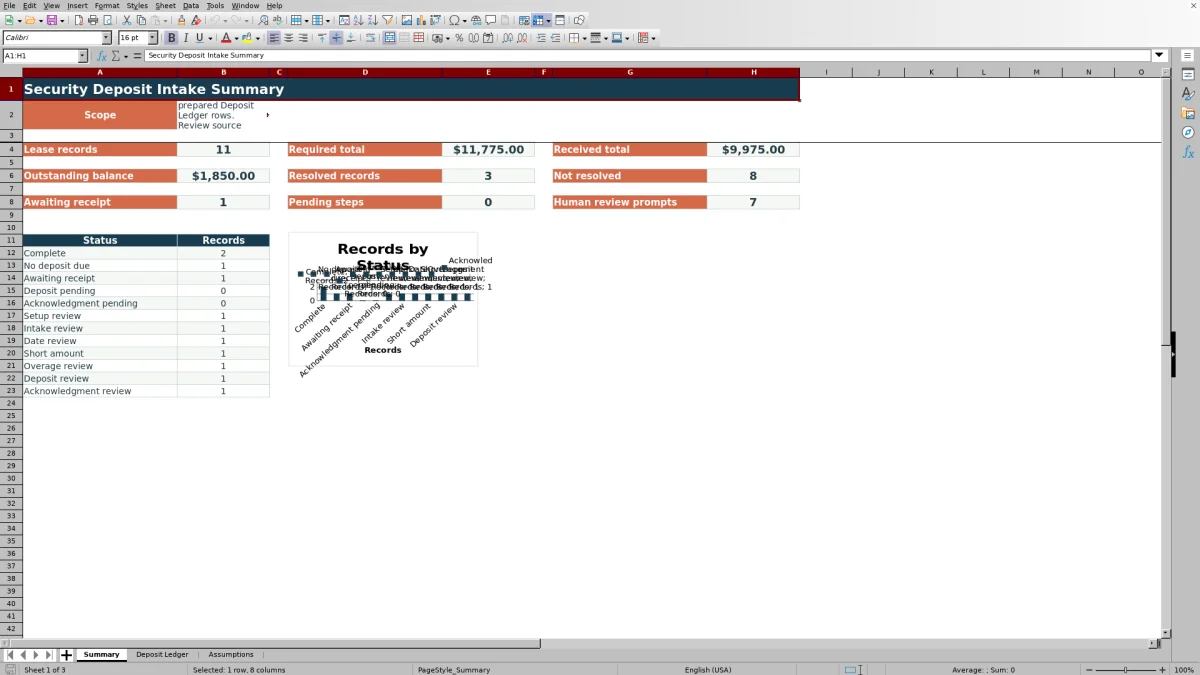
- Monitor totals and status counts from a summary sheet with a supporting chart.
- Adjust internal review settings and entry lists without changing the prepared ledger structure.
What is in the file
How to get started
1. Set the workbook assumptions
Open the Assumptions sheet and confirm the review-as-of date, timing targets, amount tolerance, maximum intake amount, allowed date range, property list, intake methods, and responsible roles.
2. Enter each tenancy
Use one Deposit Ledger row per tenancy. Complete the yellow input cells from Tenancy ID through Responsible Role, including amounts and applicable intake dates.
3. Read the calculated results
Review Balance Due, Deposit Days, Acknowledgment Days, Status, and Review Note in columns M through Q. Keep these prepared formula cells unchanged.
4. Monitor the summary
Use the Summary sheet to check required and received totals, outstanding balances, resolved records, pending steps, and records carrying review prompts.
What the security deposit intake ledger covers
The workbook centralizes security deposit intake information for individual tenancy records. Each row can show what was required, what was received, when receipt occurred, when the deposit was recorded, and when an acknowledgment was entered.
The Summary sheet uses the prepared ledger rows to report lease counts, required and received totals, outstanding balances, resolved records, pending steps, and status counts.
Information recorded for each tenancy
The Deposit Ledger contains 12 user-entry columns: Tenancy ID, Property, Unit, Lease Start, Intake Description, Required Amount, Received Amount, Date Received, Deposit Recorded Date, Acknowledgment Date, Intake Method, and Responsible Role.
Property, intake-method, and responsible-role entries use lists maintained on the Assumptions sheet. Amount and date validation also refers to editable limits on that sheet.
Calculated balances, timing, and statuses
The five calculated columns return Balance Due, Deposit Days, Acknowledgment Days, Status, and Review Note. Blank tenancy rows remain blank, while populated rows are evaluated from the entered setup, amount, and date information.
Available status categories include Complete, No deposit due, Awaiting receipt, Deposit pending, Acknowledgment pending, Setup review, Intake review, Date review, Short amount, Overage review, Deposit review, and Acknowledgment review.
Worked fictional intake scenario
A fictional tenancy has a required amount of $1,200 and a received amount of $1,200. The receipt date is March 4, 2026, the deposit-recorded date is March 6, 2026, and the acknowledgment date is March 5, 2026.
The formulas return a $0 balance, two deposit days, one acknowledgment day, and a status of Complete. This result indicates that the entered amount and workflow dates are complete under the workbook settings, so the next decision is to retain the entry with its supporting source records rather than pursue a missing intake step.
Common entry errors and solutions
A Setup review status can appear when a populated tenancy is missing required setup information such as property, unit, lease start, intake description, required amount, or responsible role.
- If a received amount is entered without a receipt date, or a receipt date appears without an amount, compare the row with the source record and complete the matching field.
- If the received amount is below the required amount, confirm both figures and update the entry if either was entered incorrectly.
- If a deposit-recorded or acknowledgment date appears without a receipt date, complete or correct the intake sequence from the source records.
- If an entry falls outside the configured amount or date limits, check the Assumptions settings and the value entered.
Comparison with a property-management system deposit module
This Excel workbook is more suitable when its prepared inputs, formulas, validation lists, 120 rows, and summary outputs match the team's deposit-intake process. A property-management system module may be more suitable when deposit activity must be maintained inside an existing resident database; available functions depend on that system.
| Consideration | Excel security deposit intake workbook | Property-management system deposit module |
|---|---|---|
| Structure | Three sheets for summary reporting, ledger entry, and assumptions. | A module or workflow within the configured property-management system. |
| Prepared capacity | 120 ledger rows, covering rows 7 through 126. | Capacity depends on the selected system and configuration. |
| Entry controls | Lists and validation for properties, methods, roles, amounts, and dates. | Controls depend on the fields and settings available in the system. |
| Calculated outputs | Balance, elapsed days, status, review note, summary indicators, and a status chart. | Outputs depend on the system's deposit module and reports. |
| Operational fit | Fits a defined spreadsheet process using the included fields and editable assumptions. | Fits teams that need deposit entries maintained within their existing resident records. |
Workbook limits and recordkeeping boundaries
The workbook supports 120 prepared ledger rows and does not contain a structured Excel table or defined names. Its formulas and summary ranges cover Deposit Ledger rows 7 through 126.
Calculated statuses and notes are workflow prompts rather than official determinations. The timing targets are editable internal settings, not fixed requirements, and entries should remain connected to the applicable lease, receipt, deposit, and acknowledgment records.
Frequently asked questions
What does this security deposit intake ledger track?
It tracks required and received amounts, receipt dates, deposit-recorded dates, acknowledgment dates, intake methods, responsible roles, calculated balances, elapsed days, statuses, and review notes by tenancy.
How many tenancy records can the workbook hold?
The Deposit Ledger includes 120 prepared entry rows, from row 7 through row 126. The formulas, validations, filter, and Summary calculations are configured for those rows.
Which fields are calculated automatically?
Balance Due, Deposit Days, Acknowledgment Days, Status, and Review Note are calculated automatically in columns M through Q for populated tenancy rows.
Can the property, intake-method, and responsible-role lists be changed?
Yes. These lists are maintained on the Assumptions sheet and feed the corresponding validation lists on the Deposit Ledger.
Are the deposit and acknowledgment timing targets fixed deadlines?
No. They are editable internal review targets on the Assumptions sheet. The workbook uses them for timing prompts, while the underlying dates and source records remain the basis for each entry.
Editorial responsibility

Marcus ReedLeasing and property workflows

Elena BrooksWorkbook logic and financial operations