This prorated rent calculator spreadsheet is an Excel workbook for calculating partial-period rent from monthly rent, a calendar-month billing period, occupancy dates, and a selected convention.
Use its prepared calculation rows to record leasing details, view billable dates and days, check calculation alerts, and track calculated or approved totals on the Summary sheet.
How this workbook can help
- Calculate rent for the inclusive overlap between a billing period and an occupancy period.
- Choose among Actual Days, 30-Day, and Annual 365 proration conventions.
- Catch missing inputs, invalid dates, excessive amounts, and non-overlapping periods before using a result.
- Track calculated totals, approved rent, record counts, and averages from one summary.
What is in the file
How to get started
1. Review the assumptions
Open the Assumptions sheet and confirm the convention divisors, annual factors, maximum monthly rent, maximum billing-period length, date boundaries, and currency rounding digits.
2. Enter one billing period per row
On the Calculations sheet, complete the record details, monthly rent, billing-period dates, occupancy dates, convention, responsibility, and status. Each row should cover one calendar-month billing period.
3. Check the calculated result
Read the billable start, billable end, billable days, period days, daily rate, prorated rent, and calculation alert. Correct the inputs when the alert identifies a problem.
4. Update status and use the summary
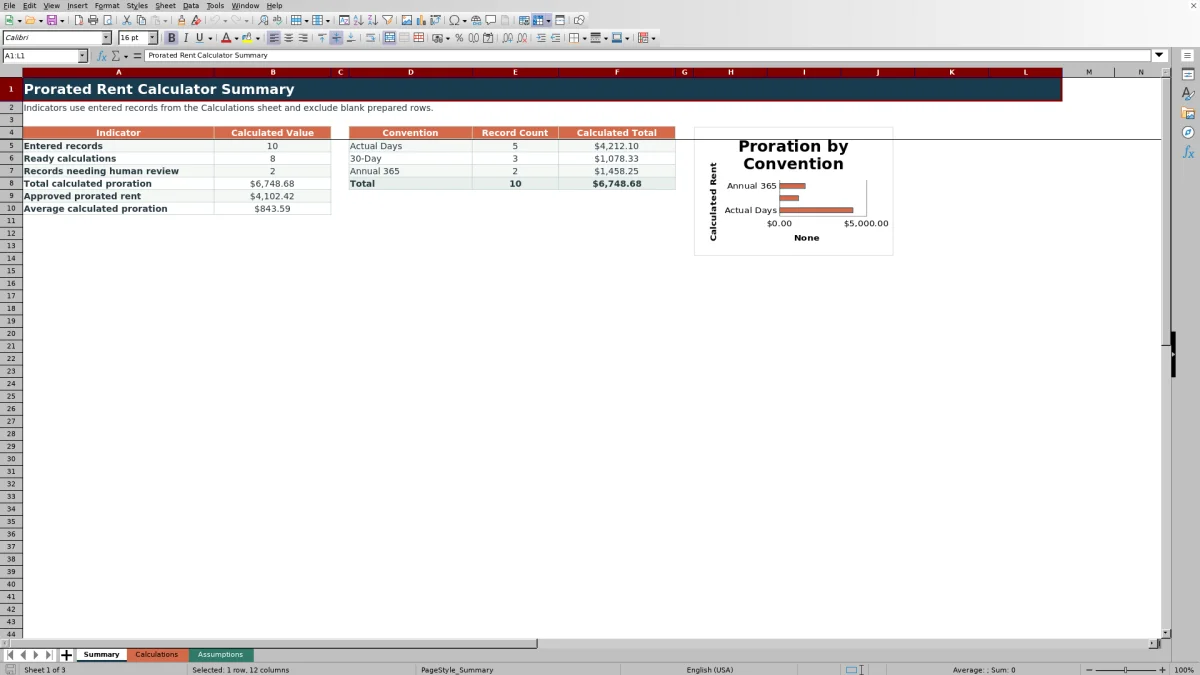
Assign the appropriate Draft, Review, Approved, or Void status. Use the Summary sheet to monitor entered records, ready calculations, exceptions, approved prorated rent, and totals by convention.
What the prorated rent workbook calculates
Purpose: The workbook calculates partial-period rent from monthly rent and the overlap between a billing period and an occupancy period. Billable start is the later of the two start dates, while billable end is the earlier of the two end dates.
Both dates are included when counting billable days. A full-period overlap returns the monthly rent, while a partial overlap uses the selected convention's daily rate and the number of billable days.
Choose a proration convention
Actual Days divides monthly rent by the inclusive number of days in the entered billing period. This allows February, a 30-day month, and a 31-day month to use their actual lengths.
30-Day divides monthly rent by the configured 30-day divisor. The default divisor is 30, and its annual factor is 1.
Annual 365 multiplies monthly rent by the configured annual factor of 12 and divides it by the configured annual divisor of 365. The Assumptions sheet allows these factors and divisors to be edited.
Worked prorated rent scenario
Input: A fictional Cedar Court record has a monthly rent of $1,800, a billing period of January 1 through January 31, and occupancy from January 10 through January 31. All identifying fields are completed, the convention is Actual Days, responsibility is Resident, and the initial status is Draft.
Result: The billable period is January 10 through January 31, or 22 inclusive days. The daily rate is $1,800 divided by 31, displayed as $58.06, and the prorated rent rounds to $1,277.42.
Interpretation: The result charges for the 22 days when the occupancy dates overlap the January billing period rather than for the entire month.
Next decision: If the completed row shows Ready and the record should be included in approved totals, change its status from Draft to Approved. Otherwise, retain the appropriate workflow status and correct any flagged input.
Common errors and solutions
A required property, unit, tenancy, rent, date, convention, responsibility, or status value is missing. Complete the empty input identified by the Check required inputs alert.
Monthly rent is zero, negative, or above the configured maximum. Enter a valid amount or adjust the Assumptions limit for the portfolio.
An end date precedes its start date, or a date falls outside the configured boundaries. Correct the date order or the applicable assumption.
The billing and occupancy ranges do not overlap. A No overlap alert appears, and the prorated-rent result remains blank.
The billing period crosses a month or year boundary or exceeds the configured maximum length. Split the entry into one calendar-month billing period per row.
The status is Void. Change the status only if the record should produce a calculated amount; Void rows intentionally leave prorated rent blank.
Workbook limits and editable controls
The Calculations sheet contains 100 prepared rows, from row 5 through row 104. Summary formulas use those rows, so the included reporting range covers those prepared records.
Default controls set the maximum monthly rent at $100,000, the maximum billing period at 31 days, and accepted entry dates from January 1, 2021, through December 31, 2031. Currency results use two rounding digits by default.
These values are editable on the Assumptions sheet. Changing them affects validation checks or calculated results, so they should remain aligned with the intended operating process.
Workbook and blank spreadsheet comparison
Use the prepared workbook when its verified fields and calculations fit the task. Start with a blank spreadsheet when you need to design a different model and can build and test every field and formula yourself.
| Method | Setup | Calculations and review | Practical fit |
|---|---|---|---|
| This Excel workbook | Use the prepared structure in the validated file | Review the documented calculations and results | Local editable workflow supported by the workbook |
| Blank spreadsheet | Create the structure yourself | Build and test every formula and check | A custom model built from scratch |
Use statuses and summary totals
The Status field supports Draft, Review, Approved, and Void. Draft and Review can preserve work in progress, Approved amounts feed the approved prorated-rent indicator, and Void suppresses the row's prorated-rent result.
The Summary sheet counts entered records, Ready calculations, and records with check or no-overlap alerts. It also reports total calculated proration, approved prorated rent, average calculated proration, and record counts and calculated totals for each convention.
Blank prepared rows are excluded from entered-record counts. Filters on the Calculations sheet can narrow the operating list by property, convention, responsibility, status, or alert.
Frequently asked questions
Which proration conventions are included?
The workbook includes Actual Days, 30-Day, and Annual 365. Their divisors and annual factors are stored on the Assumptions sheet and used by the calculation formulas.
Are billing and occupancy dates counted inclusively?
Yes. Billable days include both the calculated billable start and billable end. Period days also include both the billing-period start and end.
Can one row contain a billing period that spans two months?
No. Each row is designed for one calendar-month billing period. A period that crosses a month or year boundary does not produce a prorated-rent result and should be split into separate monthly rows.
What happens when the occupancy dates do not overlap the billing period?
The workbook displays a No overlap alert and leaves the prorated-rent result blank because there are no billable days within that billing period.
How does status affect the calculation and summary?
A Void status suppresses the prorated-rent result. An Approved status allows the calculated amount to be included in the approved prorated-rent total, while Draft and Review support work-in-progress records.
Editorial responsibility

Marcus ReedLeasing and property workflows

Elena BrooksWorkbook logic and financial operations