The Lease Preparation Checklist is an Excel workbook for organizing approved long-term residential lease information before legal review or signing. It keeps parties, property and unit details, lease dates, charges, attachment status, responsible role, and target dates in one record.
Use the XLSX to record each package, select workflow statuses, and review formula-generated totals, preparation labels, countdowns, and follow-up prompts. A separate Summary sheet reports package, status, deadline, and recurring-charge indicators, while the Assumptions sheet controls entry boundaries and list choices.
How this workbook can help
- Keeps approved terms, parties, unit details, dates, charges, attachments, and workflow information together for each lease package.
- Uses date, decimal, and dropdown validation to support consistent entries across the checklist.
- Calculates recurring monthly totals, preparation status, days to the sign target, and follow-up prompts for each populated record.
- Summarizes package volume, legal-review stages, signing stages, deadlines, and recurring monthly charges.
What is in the file
How to get started
Review the assumptions
Open the Assumptions sheet and confirm the warning window, planning-date boundaries, monetary-entry limit, and dropdown choices used by the checklist.
Enter each lease package
Use one row on the Lease Prep sheet for each package. Add a unique package ID, property and unit information, lease parties, dates, charges, confirmation results, target dates, and notes.
Update workflow details
Select the current attachment, legal-review, signing, and responsible-role values. Keep review and sign targets current as the package moves through preparation.
Resolve prompts and monitor the summary
Check Preparation Status, Days to Sign Target, and Human Check for missing information, duplicate IDs, date issues, or target-date concerns. Then use the Summary sheet and checklist filters to monitor open work.
What the lease preparation checklist tracks
The Lease Prep sheet acts as a central record for each residential lease package. Its input columns cover package ID, property, unit, lease parties, lease dates, monthly rent, security deposit, other monthly charges, five confirmation fields, attachment status, legal-review status, signing status, responsible role, review target, sign target, and notes.
Four calculated columns turn those entries into a recurring monthly total, preparation status, days to the sign target, and a follow-up prompt. Filters across the header row help staff focus on a property, status, responsible role, or target date.
Set up controlled entries
The Assumptions sheet supplies controlled entries for the main checklist. The displayed warning window is seven calendar days, and the initial planning-date range runs from January 1, 2025, through December 31, 2031. An additional editable value sets the upper limit for monetary entries.
Date validation applies to lease, review-target, and sign-target fields. Decimal validation applies to monthly rent, security deposit, and other monthly charges. Dropdowns support confirmations, attachment status, legal-review status, signing status, and responsible role.
Worked scenario for a fictional signed package
Input: A fictional package uses ID PKG-FIC-010 for Fictional Cedar Lane, unit FIC-CL-04. The lease runs from October 1, 2026, through September 30, 2027. Monthly rent is $1,800, the security deposit is $1,800, and other monthly charges are $75. All five confirmations are Yes, attachments are Complete, legal review is Completed, signing is Signed, a responsible role is selected, and both target dates are populated.
Result: Recurring Monthly Total returns $1,875 because it adds monthly rent and other monthly charges. Preparation Status returns Ready for human review. Days to Sign Target remains blank because the signing status is Signed, and Human Check returns Signed - retain package.
Interpretation: The recurring total excludes the separately tracked security deposit, while the preparation label shows that the required checklist inputs and date sequence passed the workbook checks.
Next decision: Keep the signed package record available for operational tracking and confirm that it appears in the Summary sheet's signed-package count.
Common errors and solutions
When a formula or validation rule flags a row, check the source fields rather than replacing a calculated value.
- A duplicate package ID produces a duplicate-ID preparation warning. Assign a unique identifier to each package.
- A lease end date on or before the lease start date produces a date warning. Correct the source dates.
- Blank required fields, No confirmations, an Incomplete attachment status, or missing workflow and target entries keep the row in Needs check status. Complete or correct the applicable fields.
- A rejected date or monetary entry may fall outside the editable limits on the Assumptions sheet. Verify the entry and adjust the assumption only when the operating range truly needs to change.
- An unsigned package past its sign target appears as past target. Confirm the signing status and correct the target only if the entered date is inaccurate.
Workbook and blank spreadsheet comparison
Use the prepared workbook when its verified fields and calculations fit the task. Start with a blank spreadsheet when you need to design a different model and can build and test every field and formula yourself.
| Method | Setup | Calculations and review | Practical fit |
|---|---|---|---|
| This Excel workbook | Use the prepared structure in the validated file | Review the documented calculations and results | Local editable workflow supported by the workbook |
| Blank spreadsheet | Create the structure yourself | Build and test every formula and check | A custom model built from scratch |
Workbook limits to understand
This file is an operational aid, not a determination of legal sufficiency. Its preparation labels depend on the values entered and on the specific completeness and date checks contained in the formulas.
- The prepared range supports 100 package records in rows 5 through 104. Expanding it requires extending formulas, validation, formatting, filters, and Summary references.
- The workbook has no charts and does not use a formal Excel table object.
- Deadline calculations use the current date, so target-day results can change as time passes.
- The warning window, date boundaries, and monetary limit require appropriate Assumptions values.
- The workbook tracks attachment status rather than evaluating attachment content.
Use the summary for recurring follow-up
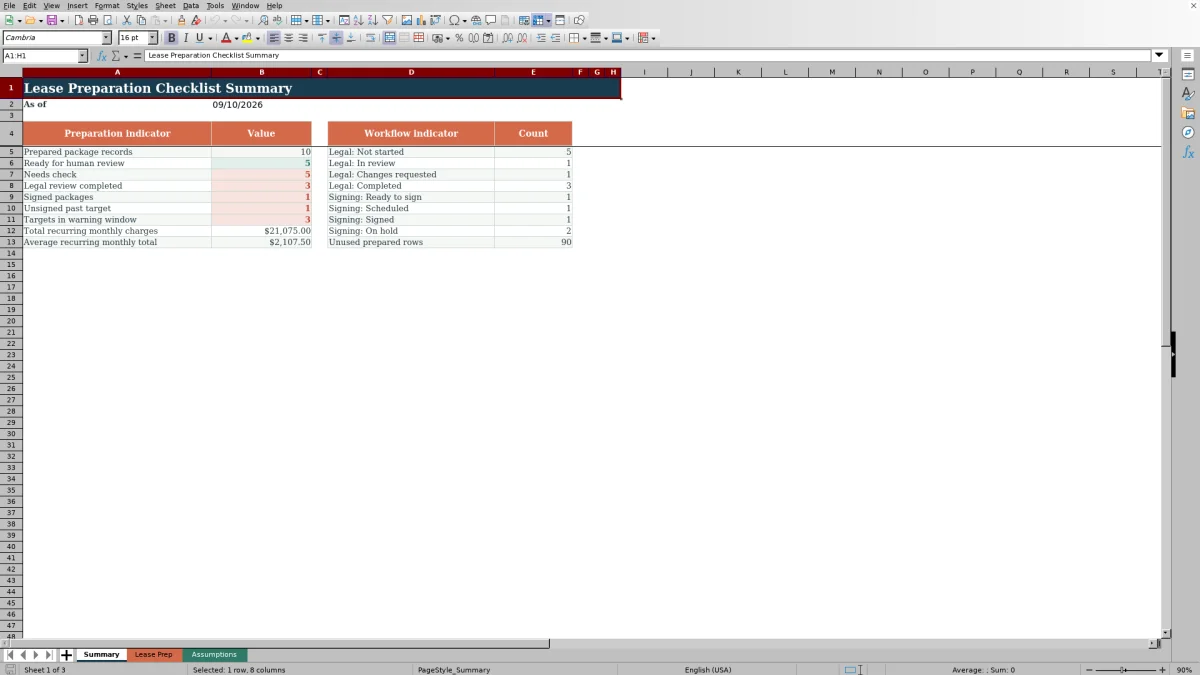
The Summary sheet reports the current date along with prepared-package volume, preparation outcomes, legal-review stages, signing stages, unsigned packages past target, and targets within the warning window. It also totals and averages recurring monthly charges.
At each review cycle, start with the deadline and workflow counts, then filter the Lease Prep sheet to the affected rows. Review the responsible role, target dates, outstanding-item notes, and Human Check result before updating the source fields. Because the recurring monthly calculation adds rent and other monthly charges, use the separate Security Deposit column when checking deposit amounts.
Frequently asked questions
What information does the lease preparation checklist capture?
It captures package, property, unit, party, lease-date, charge, confirmation, attachment, legal-review, signing, responsibility, target-date, and notes information. It also provides four calculated outputs for each populated row.
How is Preparation Status determined?
The formula checks for duplicate package IDs, required blank fields, confirmation results, attachment status, workflow values, target dates, and whether the lease end date follows the lease start date. A complete row with an acceptable date sequence returns Ready for human review; identified issues return a Needs check label.
What is included in Recurring Monthly Total?
Recurring Monthly Total adds Monthly Rent and Other Monthly Charges. The Security Deposit is recorded separately and is not included in that recurring figure.
How does the workbook track signing deadlines?
Days to Sign Target compares the sign target with the current date for unsigned packages. The Summary sheet separately counts unsigned packages past target and targets falling within the warning window set on the Assumptions sheet.
Can the checklist hold more than 100 lease packages?
The prepared input area contains 100 rows, from row 5 through row 104. Adding more rows requires extending the four formula columns, validation ranges, conditional formatting, filter range, and Summary formulas so the additional records are included.
Editorial responsibility

Marcus ReedLeasing and property workflows

Elena BrooksWorkbook logic and financial operations