This Tenant Complaint Resolution Log is an Excel workbook for recording residential tenant complaints from receipt through closure or withdrawal. It organizes the complaint details, response, assigned owner, corrective action, target date, cost, responsibility, and current status in one structured register.
Use the XLSX workbook to maintain up to 120 complaint records, calculate response and resolution timing, and view totals and status counts on the Summary sheet. Editable assumptions and dropdown choices help property-management teams apply consistent internal categories and workflows.
How this workbook can help
- Keep complaint details, responses, ownership, corrective actions, and closure information together.
- Monitor open, closed, withdrawn, and past-target complaints from a formula-driven summary.
- Measure response and resolution intervals without calculating elapsed days manually.
- Apply consistent categories, priorities, responsibilities, and statuses through editable dropdown choices.
What is in the file
How to get started
Review the assumptions
Open the Assumptions sheet and confirm the response follow-up period, aging warning period, cost threshold, date boundaries, and dropdown choices for your operation.
Enter each complaint
Replace the fictional samples with a unique complaint ID, property, unit, tenancy contact, received date, category, priority, complaint details, assigned owner, and status.
Document the response and action
Add the response date and notes, corrective action, vendor, target date, responsibility, and direct cost as the matter progresses. Update the status to reflect the current stage.
Close and monitor the record
Enter the closed date when applicable, review formula-generated alerts in the log, and use the Summary sheet to monitor complaint counts, timing, costs, and status distribution.
What the Tenant Complaint Log Records
The Complaint Log provides a structured record for each matter. Its fields cover the complaint ID, property, unit, tenancy contact, received date, category, priority, details, response, assigned owner, corrective action, vendor, target date, closed date, direct cost, responsibility, and status.
The table includes filters across all 21 columns. This supports focused views by property, owner, priority, category, responsibility, or status while keeping the original records in one register.
Response and Resolution Calculations
The calculated columns add timing visibility without requiring manual date subtraction. Response Days measures the interval between the received and response dates when both entries are valid Excel dates. Age / Resolution Days measures the interval from receipt to closure, or from receipt through today for an active complaint without a closed date.
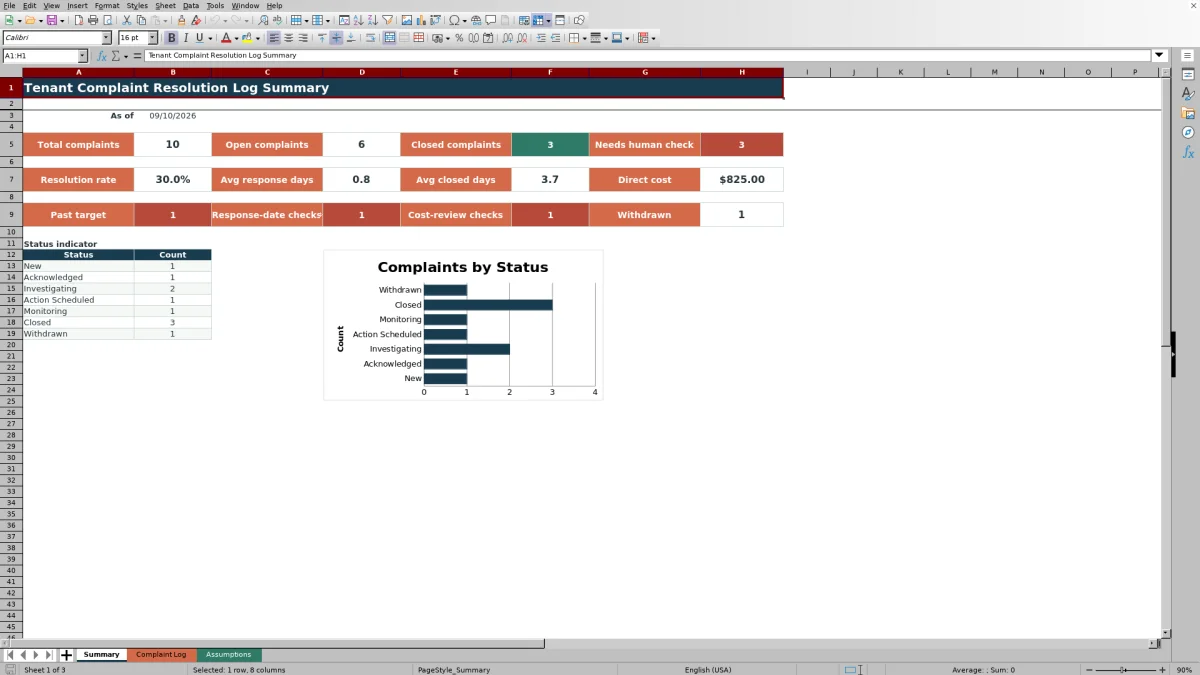
The Summary sheet uses the log to calculate total, open, closed, withdrawn, and flagged complaint counts. It also reports the resolution rate, average response days, average closed days, and total direct cost. Open complaints are those marked New, Acknowledged, Investigating, Action Scheduled, or Monitoring.
Worked Scenario for a Fictional Maintenance Complaint
Input: Fictional complaint FIC-CMP-010 is received on 03/02/2026, answered on 03/03/2026, and closed on 03/07/2026. The user records Maintenance as the category, Closed as the status, and $185 as the direct cost.
Result: Response Days returns 1, while Age / Resolution Days returns 5. The complaint contributes to the total and closed counts, and its $185 cost contributes to the direct-cost total.
Interpretation: The record shows a one-day interval before the documented response and a five-day interval from receipt to closure. Those figures describe elapsed time; they do not determine whether the handling met a particular policy.
Next decision: Confirm that the response notes, corrective action, responsibility, and closure details are complete. If they are accurate, retain the Closed status; if work remains, update the record to the applicable active status and target date.
Common Errors and Solutions
When a metric or alert appears unexpected, correct the source entry rather than overwriting a calculated cell.
- If a complaint is missing from dashboard totals, confirm that it has a complaint ID in column A.
- If response or resolution days are blank, enter the relevant values as valid Excel dates rather than free-form text.
- If a date is rejected, compare it with the editable earliest and latest dates on the Assumptions sheet.
- If a record is counted under the wrong status, select the intended value from the Status dropdown.
- If a cost entry is rejected, use a nonnegative numeric amount.
- If an alert identifies a past target or cost review, check the target date or direct cost against the corresponding assumption.
Workbook and blank spreadsheet comparison
Use the prepared workbook when its verified fields and calculations fit the task. Start with a blank spreadsheet when you need to design a different model and can build and test every field and formula yourself.
| Method | Setup | Calculations and review | Practical fit |
|---|---|---|---|
| This Excel workbook | Use the prepared structure in the validated file | Review the documented calculations and results | Local editable workflow supported by the workbook |
| Blank spreadsheet | Create the structure yourself | Build and test every formula and check | A custom model built from scratch |
Workbook Limits and Appropriate Use
This workbook is an operational aid, not a rule-setting system. Its limits and alerts are editable review settings and do not establish required response periods, closure standards, or other obligations.
- The prepared complaint table and formulas cover 120 entry rows, from row 5 through row 124.
- The dashboard depends on populated complaint IDs, valid dates, numeric costs, and consistent status selections.
- The status summary is built around New, Acknowledged, Investigating, Action Scheduled, Monitoring, Closed, and Withdrawn.
- Closed or withdrawn records without a valid closed date do not receive an ongoing age calculation.
- The fictional examples must be replaced before the workbook is used for operational records.
Maintaining Consistent Complaint Records
Use a consistent complaint ID format and update each record as new information becomes available. Response notes should describe the communication made, while Corrective Action should record the action taken or planned. The Assigned Owner field identifies the person responsible for coordinating the matter, and Responsibility records the operational allocation selected from the workbook list.
Review the Assumptions sheet before changing a workflow. Its fixed source ranges supply the dropdown choices, while its numeric settings control response follow-up, aging, and cost-review alerts. If status labels are changed, align the Summary sheet labels so its counts and chart continue to represent the intended workflow.
Frequently asked questions
How many tenant complaints can the workbook hold?
The prepared Complaint Log contains 120 entry rows, covering rows 5 through 124. Its formulas, validations, table, and filters are configured for that range.
How are response and resolution days calculated?
Response Days is the difference between the response date and received date. Age / Resolution Days uses the closed date when present; for an active complaint without a closed date, it calculates elapsed days from receipt through today.
Can the complaint categories and statuses be changed?
Yes. The Assumptions sheet contains editable lists for category, priority, responsibility, and status. The Summary sheet is built around the seven supplied status labels, so its labels should be aligned with any status changes.
What do the workbook alert messages mean?
The formula-generated messages identify entries that may have missing core fields, date problems, a past target, or a direct cost above the editable threshold. They are operational prompts and do not determine the action that must be taken.
Are the sample complaints real tenant records?
No. The included people, properties, units, vendors, complaint details, and costs are identified as fictional and should be replaced with appropriate working information.
Editorial responsibility

Marcus ReedLeasing and property workflows

Elena BrooksWorkbook logic and financial operations