The Tenant Service Request Tracker is an Excel workbook for long-term residential rental teams managing non-maintenance account and administrative requests from receipt through resolution.
Use the structured request log to assign responsibility, calculate internal target dates, monitor timing, check record completeness, and review request activity on the summary sheet.
How this workbook can help
- Keep tenant account and administrative requests organized in one consistent log.
- Monitor open, upcoming, past-due, resolved, and closed requests using calculated indicators.
- Assign each request to a responsible property-management role and track its current status.
- Review request volume, resolution time, related amounts, and records requiring attention from the summary sheet.
What is in the file
How to get started
Set the operating choices
Open the Assumptions sheet to review the as-of date, request types, responsible roles, statuses, and internal target days. Target-day values can be set from 1 to 30 calendar days.
Replace the demonstration records
Remove or overwrite the fictional sample requests on the Requests sheet before using the workbook for operational records.
Enter and update each request
Complete the request ID, property, unit, tenant or household, request type, received date, description, responsible role, and status. Add a related amount or resolved date when applicable.
Review calculated follow-up information
Use the target date, days open, resolution days, timing check, and record check columns to guide follow-up. Filter the request log as needed, then review totals and status counts on the Summary sheet.
A Structured Log for Tenant Service Requests
The workbook creates a central request record for non-maintenance tenant account and administrative matters. Each row can capture the request ID, rental property, unit, tenant or household, request type, received date, description, responsible role, related amount, and status.
Calculated columns keep target dates and follow-up indicators beside the source information, while filters help property-management teams focus on a particular property, responsibility, status, or timing condition.
Configurable Target Dates and Status Tracking
Each request type on the Assumptions sheet has a configurable target of 1 to 30 days. The workbook treats these values as internal calendar-day goals, not external requirements. After a request type and valid received date are entered, Excel calculates the target date.
Active records can display days open, while resolved or closed records can display resolution days when the required dates are valid. Timing prompts identify conditions such as past due, due today, due soon, or a record that needs checking.
Worked Tenant Account Request Scenario
Consider a fictional account question received on September 10, 2026. The user selects Account Question, assigns Accounting, chooses New as the status, and uses an as-of date of September 15, 2026. The configured target for that request type is five calendar days.
This input-to-decision example produces a target date of September 15 and five days open. The timing result indicates that the request is due today. The property-management team can interpret that result as a same-day follow-up prompt, contact the responsible role, and then update the status or resolved date based on what occurs.
Common Errors and Practical Solutions
The workbook uses validation and record checks to identify common entry problems. A missing property, unit, tenant or household, request type, received date, description, responsible role, or status can produce a required-fields prompt. Complete the missing source fields rather than overwriting calculated cells.
- If a request ID is duplicated, assign a unique identifier within the 100-row request range.
- If a target date is blank, confirm that the request type matches an Assumptions entry and that the received date is a valid Excel date.
- If a resolved or closed record needs review, confirm that the resolved date is present and is not earlier than the received date.
- If date-based indicators appear incorrect, verify the as-of date on the Assumptions sheet.
Reading the Summary Sheet
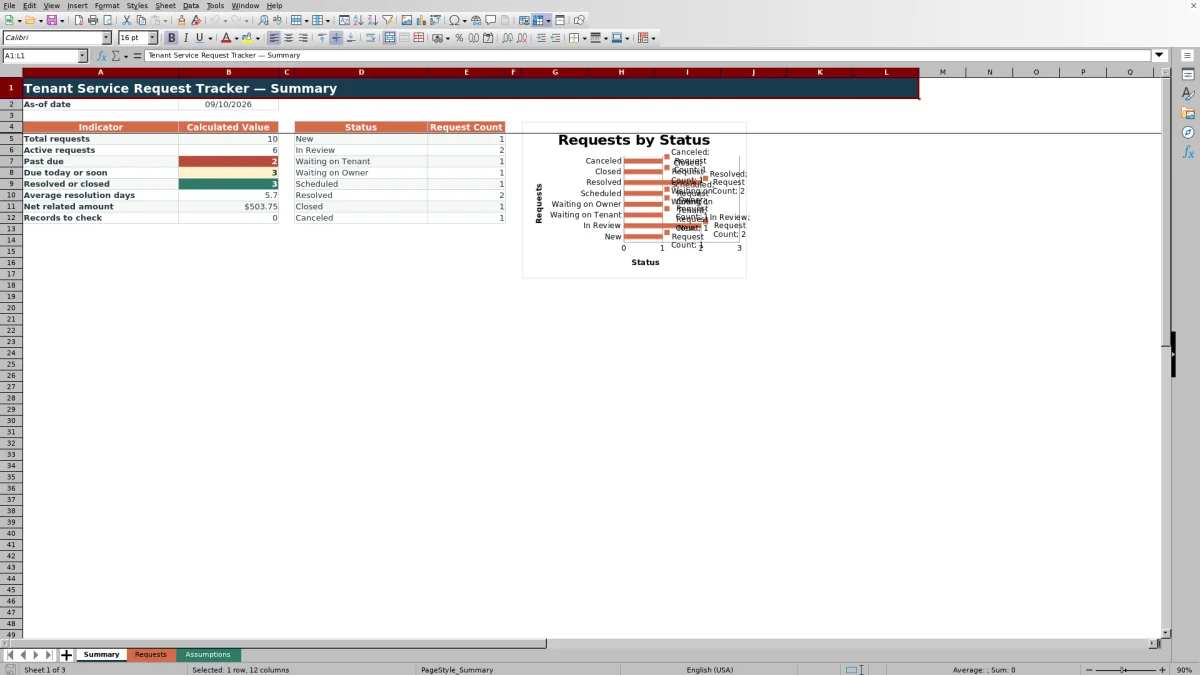
The as-of summary reports total requests, active requests, past-due items, requests due today or soon, resolved or closed requests, average resolution days, net related amount, and records requiring a check.
A separate status area counts requests against the configured status list, and the included chart visualizes those status counts. Because the metrics depend on the request log and Assumptions settings, users should keep the as-of date and status configuration current.
Workbook and blank spreadsheet comparison
Use the prepared workbook when its verified fields and calculations fit the task. Start with a blank spreadsheet when you need to design a different model and can build and test every field and formula yourself.
| Method | Setup | Calculations and review | Practical fit |
|---|---|---|---|
| This Excel workbook | Use the prepared structure in the validated file | Review the documented calculations and results | Local editable workflow supported by the workbook |
| Blank spreadsheet | Create the structure yourself | Build and test every formula and check | A custom model built from scratch |
Workbook Scope and Limits
The workbook has practical limits: it provides 100 request rows and is designed for non-maintenance account and administrative requests rather than maintenance work orders. Its target days are internal planning goals, and its alerts are prompts to verify details before acting.
The Requests sheet is a filtered range rather than an Excel table. Formulas also reference designated positions in the editable status list, so changes to status choices should preserve the intended workflow and be tested to confirm that summary and timing results remain appropriate.
Frequently asked questions
What tenant requests can this Excel workbook track?
It is designed for non-maintenance account and administrative requests. Default request types include account questions, document copies, lease administration, move-in and move-out administration, parking or access, pet administration, resident information updates, and other administrative matters.
How are target dates calculated?
The workbook adds the selected request type's configured number of calendar days to the received date. Those target-day values are editable on the Assumptions sheet and are described as internal goals rather than external requirements.
Which fields are calculated automatically?
The Requests sheet calculates the target date, days open, resolution days, timing check, and record check. Users enter the identifying details, request information, responsible role, status, and applicable dates or related amount.
Can the request types, roles, and statuses be changed?
Yes. The Assumptions sheet contains editable request types, target-day values, responsible roles, and statuses. Because formulas reference designated status positions, test changes to confirm that timing and summary calculations still match the intended workflow.
How many requests does the tracker hold?
The Requests sheet provides 100 prepared rows, from row 5 through row 104. The included fictional demonstration records should be removed or replaced before operational use.
Editorial responsibility

Marcus ReedLeasing and property workflows

Elena BrooksWorkbook logic and financial operations