This late rent follow-up tracker is an Excel workbook for recording overdue balances, contact attempts, payment commitments, assigned responsibility, case status, and the next follow-up date selected under manager-defined procedures.
The spreadsheet includes separate sheets for case records, contact history, summary indicators, and editable assumptions. Formulas calculate balances, days late, contact counts, follow-up alerts, and aging-review prompts for up to 100 cases and 100 contact attempts.
How this workbook can help
- Keeps overdue balances, commitments, case notes, responsibility, and follow-up dates in one structured record.
- Separates case-level information from individual contact attempts while linking entries through case IDs.
- Surfaces past-due follow-ups, follow-ups due today, upcoming commitments, and aged balances.
- Provides summary counts and totals without sending communications, processing payments, or changing case status automatically.
What is in the file
How to get started
1. Confirm the operating thresholds
Open the Assumptions sheet and confirm the aged-balance review threshold and upcoming commitment window. The supplied defaults are 30 days and 7 days.
2. Enter or update each case
Use Late Rent Cases to record a unique case ID, property, unit, tenancy name, rent due date, amounts due and received, commitment details, next follow-up date, responsibility, status, and case note.
3. Record every contact attempt
Add each phone, email, letter, in-person, or other contact to Contact Log. Enter the matching case ID, contact date, description, any commitment, outcome, responsibility, and selected follow-up date.
4. Work from the calculated prompts
Check Summary and the detailed sheets for overdue or same-day follow-ups, upcoming commitments, unmatched case IDs, balances that reached the aging threshold, and closed cases with a remaining balance. Update the source entries after the next action or payment is recorded.
A Structured Record for Late Rent Follow-Up
The workbook uses a case register for the current balance and case details, while a separate contact history records each outreach attempt. A shared case ID connects the two records and allows the case sheet to count logged attempts.
Case fields cover the property, unit, tenancy name, due date, original amount due, amount received, commitment details, next follow-up date, responsibility, status, and notes. Contact fields cover the date, method, description, outcome, commitment, responsibility, and next follow-up.
From Data Entry to the Next Follow-Up
Enter the current financial details and select a next follow-up date under the applicable operating procedure. The workbook then evaluates whether the case is scheduled, due today, past due, missing a follow-up, cleared, or closed with a balance that needs verification.
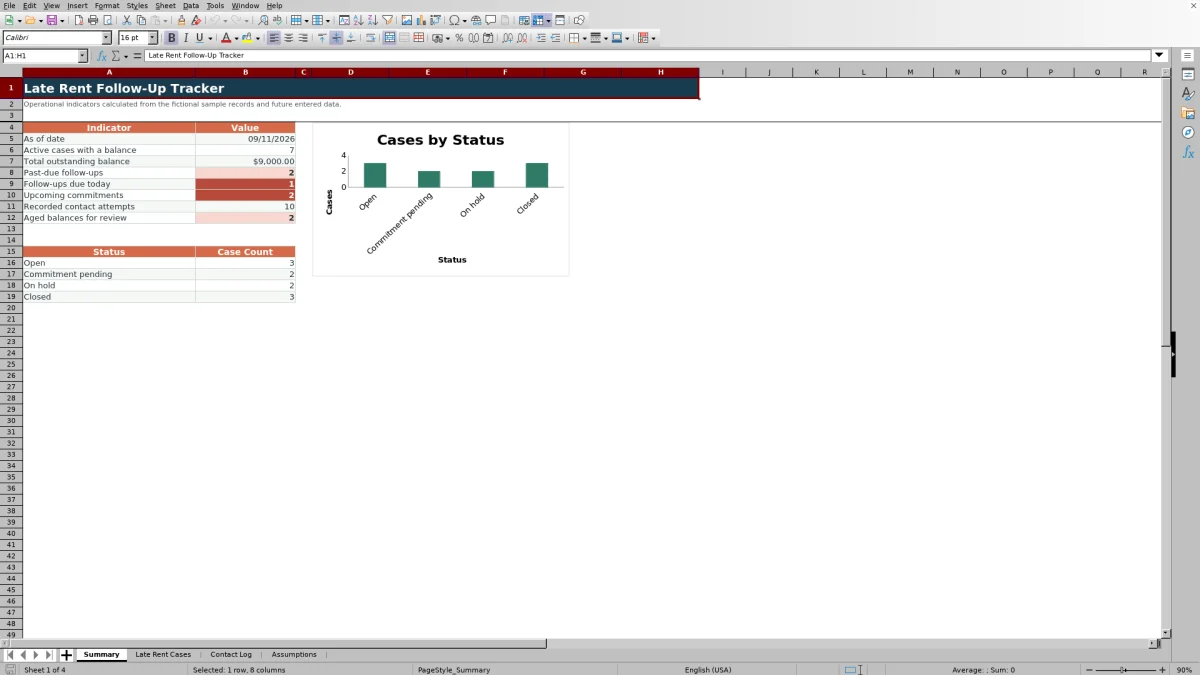
The Summary sheet consolidates active cases with balances, total outstanding balance, overdue and same-day follow-ups, upcoming commitments, recorded contact attempts, aged balances, and status counts.
Worked Fictional Scenario
Input: fictional case CASE-FIC-001 records an original amount due of $1,450, an amount received of $500, a $500 commitment dated September 13, 2026, and a next follow-up date of September 10, 2026.
Result: the outstanding balance formula returns $950, and the contact-attempt formula counts the two matching entries in the sample Contact Log. On September 10, the follow-up result is “Follow up today”; after that date, it becomes “Past due follow-up” unless the source record changes.
Interpretation: the case still has a balance and is marked Commitment pending. Next decision: the assigned property manager checks the recorded response, then updates the amount received, commitment details, next follow-up date, or status according to the documented outcome.
Calculated Alerts and Summary Indicators
The follow-up alert is based on the case ID, outstanding balance, case status, and next follow-up date. Days late is calculated as calendar days after the entered rent due date, while the aging prompt appears when a positive balance reaches the editable threshold.
The upcoming commitment indicator counts active cases with a positive commitment amount and a commitment date from today through the configured window. The default window is seven days, and the default aging threshold is 30 days.
Common Errors and Solutions
- If a contact entry has no case ID, the Case Check displays “Case ID needed.” Enter the corresponding case ID from Late Rent Cases.
- If the ID does not match exactly one case, the workbook displays Check case ID. Correct the ID or resolve duplicate case records.
- If an active case with a balance has no next follow-up date, the alert displays “Set follow-up.” Enter the date selected by the responsible person.
- If a case is marked Closed while a balance remains, the alert displays “Closed - verify.” Confirm the entered amounts and status, then correct the source fields if necessary.
- If a cleared balance still appears unexpected, confirm the original amount due and amount received because the calculated balance cannot fall below zero.
Workbook and blank spreadsheet comparison
Use the prepared workbook when its verified fields and calculations fit the task. Start with a blank spreadsheet when you need to design a different model and can build and test every field and formula yourself.
| Method | Setup | Calculations and review | Practical fit |
|---|---|---|---|
| This Excel workbook | Use the prepared structure in the validated file | Review the documented calculations and results | Local editable workflow supported by the workbook |
| Blank spreadsheet | Create the structure yourself | Build and test every formula and check | A custom model built from scratch |
Workbook Limits and Operating Boundaries
The alerts are internal prompts only. They do not send notices, contact tenants, process payments, determine fees, interpret lease terms, or establish legal status.
Days late uses calendar days after the entered rent due date and does not account for grace periods or other lease-specific requirements. TODAY-based results change with the spreadsheet application's current date. The sample properties, tenancies, identifiers, commitments, and transactions are fictional.
Frequently asked questions
What does the late rent follow-up tracker calculate?
It calculates the outstanding balance, calendar days late, follow-up alert, number of matching contact attempts, and whether a positive balance has reached the configured aging threshold. The Summary sheet also calculates totals and status counts.
How are contact attempts connected to late-rent cases?
Each Contact Log entry uses a case ID that should match one case in Late Rent Cases. The workbook checks the ID and counts matching contact entries on the corresponding case row.
Can I change the aging and commitment windows?
Yes. The Assumptions sheet contains editable values for the aged-balance review threshold and upcoming commitment window. Both accept whole numbers from 0 through 365.
Does the Excel workbook send reminders or process rent payments?
No. It records information and produces internal prompts, but it does not send messages, issue notices, process payments, or automatically confirm official case status.
What do the sample records represent?
All included properties, units, tenancies, case IDs, contact attempts, commitments, and transactions are fictional examples. Replace or clear them before using the workbook for operational records.
Editorial responsibility

Marcus ReedLeasing and property workflows

Elena BrooksWorkbook logic and financial operations