This returned rent payment log is an Excel workbook for recording payment returns, bank reasons, entered charges, replacement activity, outstanding balances, and follow-up details. It provides 100 prepared record rows for long-term residential rental and property-management operations.
The XLSX includes a summary view, a detailed Returned Payments sheet, and an Assumptions sheet for editable dates, thresholds, properties, vendors, reasons, responsibilities, and statuses. Fictional sample entries demonstrate how the calculations and follow-up indicators work.
How this workbook can help
- Keeps returned-payment, replacement, and follow-up details in one structured record.
- Calculates the total to recover, outstanding balance, and days open for each entry.
- Summarizes amounts, open balances, overdue follow-up, upcoming due dates, and replacement coverage.
- Uses editable lists and limits to support consistent dates, amounts, reasons, responsibilities, and statuses.
What is in the file
How to get started
1. Configure the assumptions
Open the Assumptions sheet and set the as-of date, charge review limit, open-item age threshold, accepted date range, and dropdown-list values for your operation.
2. Enter each returned payment
Remove or replace the fictional examples. On the Returned Payments sheet, use one row for each return and enter the property, tenancy reference, payment dates, bank reason, returned amount, and any entered charge.
3. Record replacement and follow-up activity
Update the replacement status, received date, replacement amount, follow-up due date, follow-up status, and notes as the item progresses.
4. Monitor calculated results
Check the total to recover, outstanding amount, days open, and review flag on each row. Use the filters and Summary sheet to identify balances, overdue items, upcoming due dates, and records requiring correction.
What the Returned Payment Log Records
Use one row per returned payment to connect the property, unit, tenancy reference, original payment date, return date, bank or payment vendor, bank reason, returned amount, and entered charge. The same row also holds responsibility, replacement activity, follow-up details, and notes.
The final four columns are calculated. They show the total to recover, the outstanding amount, days open, and a review flag based on the entered values and editable assumptions.
How the Workbook Calculates Open Amounts
Total to Recover adds the returned amount and entered charge. Outstanding Amount subtracts the replacement amount without producing a balance below zero.
Days Open measures from the return date. An open balance uses the Assumptions sheet's as-of date, while a resolved balance can use the replacement received date when one is entered. The review formula can identify missing tenancy details, missing dates, date-order problems, future return dates, invalid amounts, replacement-date issues, overdue follow-up, and assumption-based review conditions.
Worked Fictional Payment Scenario
Input: a fictional Maple Landing record has a $1,325 returned amount, a $25 entered charge, a $700 replacement amount, an August 29, 2026 return date, and a September 9 follow-up due date. The workbook's as-of date is September 11, 2026.
Result: Total to Recover is $1,350, $650 remains outstanding, and Days Open is 13. Because the open balance has a due date before the as-of date, the record indicates that follow-up is overdue.
Interpretation: the partial replacement reduced the balance but did not resolve the item. The next decision is to choose the next collection action and then update the follow-up status, notes, and due date to reflect that action.
Using the Summary for Follow-Up
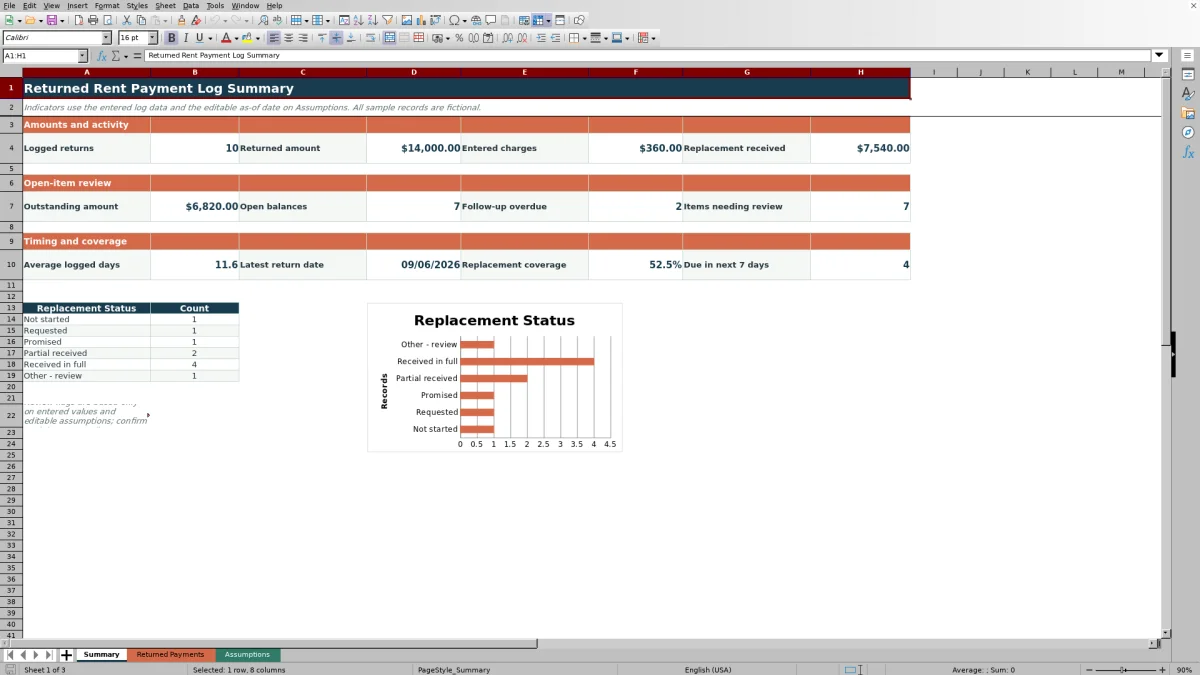
The Summary sheet reports logged returns, returned amounts, entered charges, replacement amounts, outstanding amounts, open-balance counts, overdue follow-up, and items needing attention. It also shows average logged days, the latest return date, replacement coverage, and open items due within seven days of the selected as-of date.
Replacement-status counts and the accompanying chart provide a quick view of how many records are not started, requested, promised, partially received, received in full, or written off. Filters on the Returned Payments sheet can then narrow the log by property, reason, responsibility, status, due date, or review flag.
Common Entry Errors and Solutions
- A blank property prevents the row from being counted as a logged return. Select or enter the property before relying on the summary.
- Missing payment dates, return dates, tenancy details, or returned amounts can leave calculations blank or produce a review flag. Complete the source fields rather than replacing formula results.
- A return date before the payment date or after the as-of date can trigger a date-related flag. Confirm the dates and correct the applicable entry.
- A replacement amount or date that conflicts with the return details can affect aging and status interpretation. Reconcile the replacement fields with the recorded transaction.
- If an entry exceeds an editable validation boundary, confirm the Assumptions setting before changing it. In every case, fix the source entry so dependent totals update consistently.
Workbook and blank spreadsheet comparison
Use the prepared workbook when its verified fields and calculations fit the task. Start with a blank spreadsheet when you need to design a different model and can build and test every field and formula yourself.
| Method | Setup | Calculations and review | Practical fit |
|---|---|---|---|
| This Excel workbook | Use the prepared structure in the validated file | Review the documented calculations and results | Local editable workflow supported by the workbook |
| Blank spreadsheet | Create the structure yourself | Build and test every formula and check | A custom model built from scratch |
Workbook Limits and Operating Controls
The formulas and summary ranges cover rows 4 through 103, providing capacity for 100 records. Entries added outside that range will not be included unless the formulas, validations, filters, formatting, and summary references are extended.
The as-of date does not advance automatically; update it on the Assumptions sheet when preparing current aging and due-date indicators. Dropdown options also depend on the lists maintained on that sheet.
Review flags are indicators, not determinations. They rely on the values entered and cannot verify bank documentation, tenancy records, responsibility, or whether an entered charge is appropriate. The charge review limit only flags amounts above the selected threshold.
Frequently asked questions
What information can I record in the returned rent payment log?
You can record the property, unit, tenancy reference, original payment date, return date, bank or payment vendor, bank reason, returned amount, entered charge, responsibility, replacement details, follow-up dates and statuses, and notes.
How is the outstanding amount calculated?
The workbook adds the returned amount and entered charge to calculate Total to Recover. It then subtracts the replacement amount and limits the outstanding balance to zero or more.
What does the as-of date control?
The editable as-of date supports open-item aging, overdue follow-up indicators, and the Summary count of open items due within the next seven days.
Can I change the dropdown choices?
Yes. The Assumptions sheet contains the lists for property, bank or payment vendor, bank reason, responsibility, replacement status, and follow-up status. Update those lists to reflect the terms used by your operation.
How many returned payments can the workbook track?
The prepared log contains 100 entry rows, from row 4 through row 103. Additional rows require the formulas, validations, filter range, formatting, and Summary references to be extended.
Editorial responsibility

Marcus ReedLeasing and property workflows

Elena BrooksWorkbook logic and financial operations