This rental renewal offer tracker is an Excel workbook for organizing manager-approved renewal options from initial pricing through tenant response and agreement completion.
Use the XLSX spreadsheet to record lease details, current and proposed rent, approval and sent dates, response information, agreement progress, action ownership, and notes. Formulas calculate rent changes, response deadlines, next action dates, and tracker statuses.
How this workbook can help
- Keep approval, pricing, delivery, response, and agreement details together for each renewal offer.
- Identify approved offers that have not been sent, responses that are overdue, and accepted renewals with open agreements.
- Monitor current and proposed rent totals while seeing the weighted proposed change across priced offers.
- Use calculated next action dates and assigned owners to organize renewal follow-up.
What is in the file
How to get started
1. Configure the assumptions
Review the response window, agreement follow-up period, lease planning horizon, rent-change threshold, and permitted renewal-term range on the Assumptions sheet.
2. Enter each renewal offer
Replace the fictional examples on the Renewal Offers sheet. Add the offer ID, property, unit, tenant, lease end, current rent, approval date, renewal term, proposed rent, and action owner.
3. Record delivery and response activity
Enter the offer sent date, tenant response, response date, agreement status, completion date, and notes as the renewal progresses. The workbook calculates the response due date, rent change, next action date, and tracker status.
4. Check the summary
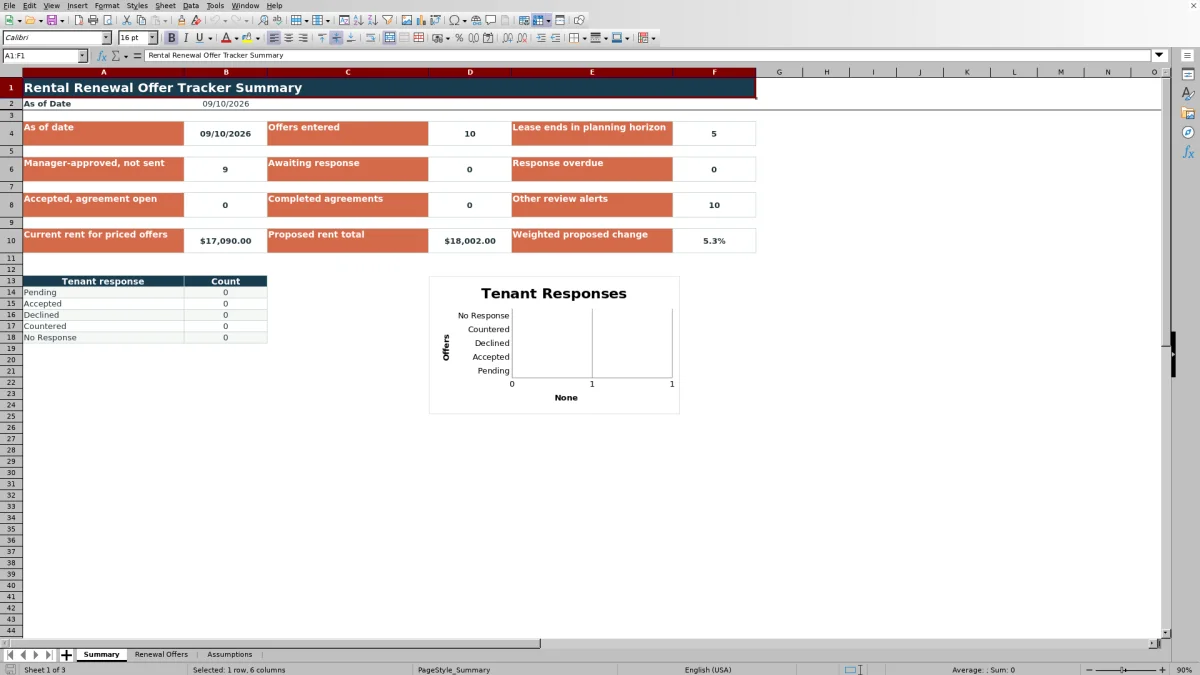
Use the Summary sheet to monitor entered offers, upcoming lease expirations, unsent approved offers, response activity, agreement progress, rent totals, and tenant response counts.
What the Rental Renewal Offer Tracker Records
The workbook is configured with 100 offer rows for long-term residential renewal activity. Each record can include the offer ID, property, unit, tenant, current lease end, current monthly rent, manager approval date, renewal term, proposed monthly rent, sent date, tenant response, response date, agreement status, completion date, action owner, and notes.
Its three-sheet structure separates portfolio reporting, offer-level records, and adjustable workflow assumptions. This keeps operating inputs in the Renewal Offers sheet while the Summary sheet reports current counts and pricing totals.
Calculations and Entry Controls
The calculated fields return the dollar and percentage rent change, response due date, next action date, and tracker status. With the default settings, a response is due 14 calendar days after the sent date, agreement follow-up is scheduled five calendar days after acceptance, and the planning horizon covers 90 days before lease end.
The validated choices include Pending, Accepted, Declined, Countered, and No Response for tenant responses. Agreement choices are Not Started, Preparing, Sent for Signature, Completed, Not Renewing, and Withdrawn. Additional validation applies to dates, nonnegative rent amounts, and renewal terms within the configured range.
Worked Renewal Scenario
Input: A fictional Cedar Lane unit has a current monthly rent of $1,500 and a proposed monthly rent of $1,575. The manager approves a 12-month term, the offer is sent September 10, 2026, and the tenant response remains Pending. The response-window assumption is 14 days.
Result: The workbook calculates a $75 monthly increase, a 5.0% change, a September 24 response due date, and a September 24 next action date. If the workbook is viewed on September 20, the tracker status is Awaiting response.
Interpretation: The proposal remains inside its response window, so it is not yet counted as overdue. Its 5.0% change is also below the default 8.0% monthly-change review threshold.
Next decision: The assigned owner can follow up by September 24 and then enter the tenant response and response date. If the tenant accepts, the owner can update the agreement status until the completed date is recorded.
Common Errors and Solutions
If no response due date appears, confirm that the offer ID and offer sent date are present. The due-date formula requires both the record and sent date.
If the tracker shows Check response date, enter a response date for an accepted offer.
If it shows Check completion date, add the agreement completed date when Agreement Status is Completed.
If it shows Check agreement status, align the agreement status with the completed date already entered.
If a date, rent, or term is rejected, use a valid Excel date, a nonnegative rent amount, or a whole-month term within the minimum and maximum assumptions.
Workbook Limits and Boundaries
The offer area is configured for rows 5 through 104, providing capacity for 100 offers. Adding records below that range requires extending formulas, validation, filtering, and any related summary references.
This is a tracking workbook rather than an email delivery, tenant portal, or electronic-signature system. Users must enter sent dates, responses, agreement updates, owners, and notes. Statuses also depend on Excel recalculating the TODAY function, so date-based results change as the workbook is opened or recalculated.
The summary reflects the current value stored for each offer. It does not provide a separate event history for every prior status change or communication.
Workbook and blank spreadsheet comparison
Use the prepared workbook when its verified fields and calculations fit the task. Start with a blank spreadsheet when you need to design a different model and can build and test every field and formula yourself.
| Method | Setup | Calculations and review | Practical fit |
|---|---|---|---|
| This Excel workbook | Use the prepared structure in the validated file | Review the documented calculations and results | Local editable workflow supported by the workbook |
| Blank spreadsheet | Create the structure yourself | Build and test every formula and check | A custom model built from scratch |
Maintaining the Renewal Workflow
Update the Renewal Offers sheet whenever an offer is approved, sent, answered, or completed. Preserve formula columns for monthly change, change percentage, response due date, next action date, and tracker status when replacing example records.
Review the Summary sheet for manager-approved offers that remain unsent, tenants awaiting response, overdue responses, accepted renewals with open agreements, completed agreements, and other workflow alerts. Adjust Assumptions values when the portfolio changes its internal timing, planning horizon, rent-change threshold, or permitted term range.
Frequently asked questions
How many rental renewal offers can the Excel tracker hold?
The configured offer area contains 100 rows, from row 5 through row 104. Using additional rows requires extending formulas, validation, filtering, and summary references.
How is the response due date calculated?
The response due date equals the offer sent date plus the Response window days setting. The default response window is 14 calendar days.
Which tenant responses and agreement statuses are available?
Tenant responses are Pending, Accepted, Declined, Countered, and No Response. Agreement statuses are Not Started, Preparing, Sent for Signature, Completed, Not Renewing, and Withdrawn.
What does the Summary sheet report?
It reports offers entered, lease ends within the planning horizon, approved offers not sent, awaiting and overdue responses, accepted offers with open agreements, completed agreements, other workflow alerts, rent totals, weighted proposed change, and counts by tenant response.
Does this Excel tracker send offers or collect signatures?
No. The workbook records offer and agreement activity but does not deliver messages or collect electronic signatures. Enter the sent date, response details, agreement status, and completion date after those actions occur.
Editorial responsibility

Marcus ReedLeasing and property workflows

Elena BrooksWorkbook logic and financial operations