This rental applicant reference check log is an Excel workbook for recording reference contacts during long-term residential leasing. It provides structured fields for applicants, applied properties and units, reference details, contact attempts, stated responses, follow-up dates, statuses, and reviewer notes.
The XLSX spreadsheet includes a 100-row Reference Log, a calculated Summary sheet, and an Assumptions sheet with visible dropdown choices and timing limits. Formulas generate check IDs, calculate days since an attempt, display follow-up flags, and update operational indicators as entries are added.
How this workbook can help
- Keeps rental applicant reference contacts, stated responses, follow-up dates, and notes in one structured record.
- Surfaces scheduled, due, incomplete, and closed reference checks through formula-based follow-up flags.
- Promotes consistent entries with dropdown choices and validation for statuses, reference types, contact methods, dates, attempt numbers, and response choices.
- Summarizes logged checks, completed checks, open statuses, attention flags, completion rate, attempt activity, and status counts.
What is in the file
How to get started
1. Review the workbook settings
Open the Assumptions sheet and review the available statuses, reference types, contact methods, response choices, follow-up window, attempt limit, and date horizons.
2. Enter each reference check
Use one Reference Log row for each check. Enter the applicant, applied property and unit, reference details, contact method, attempt date, and attempt number. The Check ID appears after the applicant field is completed.
3. Record the response and next action
Enter only the facts stated by the reference in the response fields. Add a follow-up date when another contact is planned, select the current status, identify the reviewer, and place internal observations in Reviewer Notes.
4. Monitor activity
Use the Follow-Up Flag column to locate scheduled, due, incomplete, and closed items. Open the Summary sheet to review totals, completion rate, attempt activity, and the status-count chart.
What the Rental Applicant Reference Check Log Records
The Reference Log uses one row per reference check and provides 24 fields. Core identification fields cover the applicant, applied property, applied unit, reference type, reference contact, organization, and contact method.
Attempt fields capture the date and attempt number. Response fields can record stated tenancy dates, confirmation of a role or tenancy, payment history, notice, property condition, whether the reference would rent to the applicant again, and a factual response narrative. Separate fields hold the follow-up date, reviewer, status, and reviewer notes.
- Reference types include Prior housing, Employment, Personal, and Other.
- Contact methods include Phone, Email, Letter, and Other.
- Standard response choices include Yes, No, Not stated, and Not applicable.
- Status choices include Not started, Attempted, Awaiting response, Completed, and Unable to verify.
How the Calculated Follow-Up Prompts Work
Three formula columns support day-to-day tracking. A check ID in the RC-001 format is generated when an applicant is entered. Days Since Attempt uses the attempt date and the current date, while the date-aware follow-up flag considers row completion, applicant entry, status, follow-up date, and the configured follow-up window.
A future follow-up date produces Scheduled, the current date produces Due today, and a past date produces Due. A completed status produces Closed. When no follow-up date exists, the formula can display Not started, Monitor, or Consider follow-up according to the attempt date and the default three-day window.
Worked Rental Reference Scenario
Input: A leasing coordinator enters fictional applicant Morgan Pine, a prior-housing reference contacted by phone, an attempt date of June 10, 2026, Attempt #1, an Awaiting response status, and a follow-up date of June 13, 2026. The factual-response field states that only voicemail was reached.
Result: The workbook generates an RC-numbered Check ID and calculates days since the attempt. The Follow-Up Flag displays Scheduled before June 13, Due today on June 13, and Due after that date if the status and follow-up date remain unchanged.
Interpretation: The row shows that contact was attempted but no substantive reference response was recorded. The status, response text, and follow-up flag support the same operational conclusion without treating the voicemail as verification.
Next decision: Make the scheduled contact attempt and record the applicable attempt number. If a response arrives, enter the facts as stated and select Completed; if no response arrives, update the next follow-up date or status to reflect the current record.
Common Entry Errors and Solutions
Correct entries at the source so formulas and summary counts remain meaningful.
- If other row details are entered without an applicant, add the applicant name so the Check ID can be generated and the incomplete-applicant prompt can clear.
- If an attempt number is rejected, enter a whole number from 1 through the configured maximum of 10.
- If a date is rejected, confirm that it falls within the limits stored on the Assumptions sheet. Attempt dates cannot be later than the current date under the prepared validation rule.
- If a response is unknown, use Not stated rather than guessing Yes or No. Use Not applicable when a standardized question does not apply to that reference type.
- If commentary is mixed with the reference’s statements, keep stated facts in Factual Response and move internal observations to Reviewer Notes.
- If a completed item still appears open in summary reporting, confirm that Completed is selected in the Status column.
Workbook and blank spreadsheet comparison
Use the prepared workbook when its verified fields and calculations fit the task. Start with a blank spreadsheet when you need to design a different model and can build and test every field and formula yourself.
| Method | Setup | Calculations and review | Practical fit |
|---|---|---|---|
| This Excel workbook | Use the prepared structure in the validated file | Review the documented calculations and results | Local editable workflow supported by the workbook |
| Blank spreadsheet | Create the structure yourself | Build and test every formula and check | A custom model built from scratch |
Workbook Limits and Appropriate Use
This is a recording tool, not verification. It stores what a reference stated, contact history, follow-up plans, and internal notes; it does not contact references, independently confirm claims, or make applicant eligibility decisions.
- The prepared Reference Log contains 100 rows, from row 5 through row 104.
- Check IDs, days-since-attempt calculations, and follow-up flags are prepared only for those rows.
- Date-based formulas use TODAY(), so results change with the spreadsheet application’s current date.
- The default follow-up window is three days, the maximum attempt number is 10, the future tenancy horizon is 3,650 days, and the future follow-up horizon is 365 days.
- Summary status counts depend on the statuses entered in the Reference Log and the visible values on the Assumptions sheet.
- Follow-up flags are operational prompts and do not establish whether a reference statement is accurate.
Reading the Summary Indicators
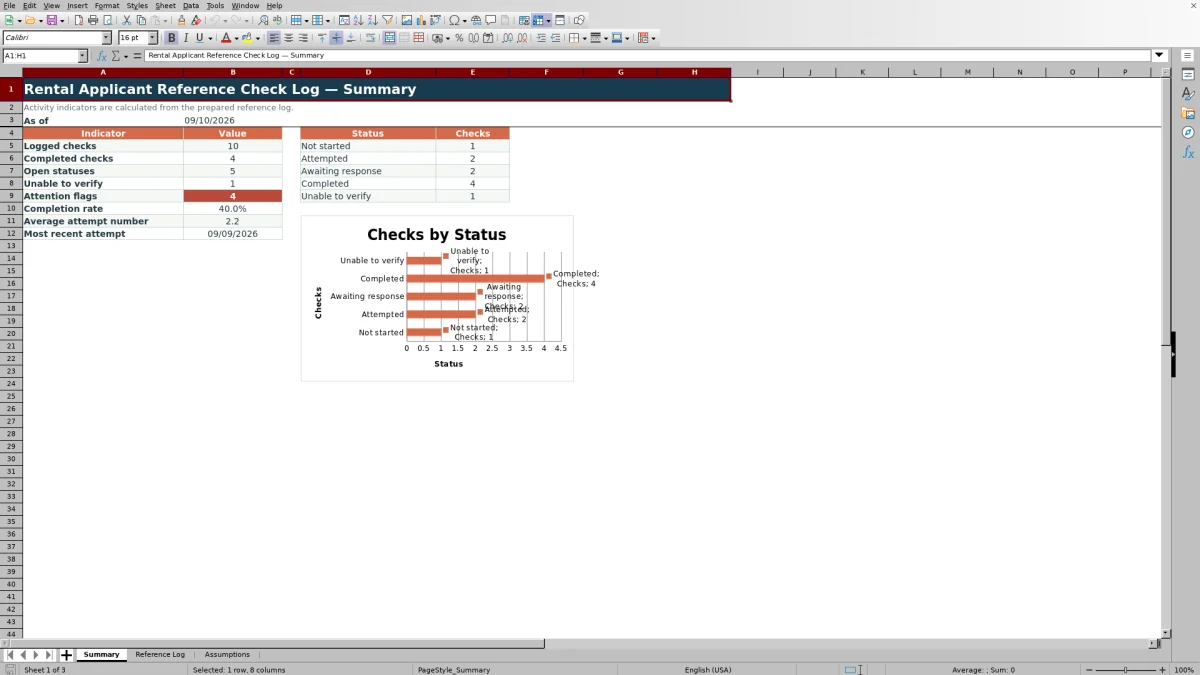
The Summary sheet presents operational indicators calculated from the prepared log. Logged checks count rows with an applicant, while completed checks count rows with the Completed status. Open statuses combine Not started, Attempted, and Awaiting response.
The sheet also reports Unable to verify entries, attention flags, completion rate, average attempt number, and the most recent attempt date. A chart displays counts for the five configured statuses. These measures describe activity in the log and should be interpreted alongside the underlying response text, status, follow-up date, and notes.
Frequently asked questions
How many rental applicant reference checks can the workbook hold?
The prepared Reference Log has 100 entry rows, covering rows 5 through 104. Each row includes formulas for the Check ID, Days Since Attempt, and Follow-Up Flag.
Which fields are calculated automatically?
The workbook calculates RC-numbered check IDs, days since each recorded attempt, follow-up flags, summary indicators, completion rate, average attempt number, the latest attempt date, and counts for the five configured statuses.
Can the dropdown choices and timing limits be changed?
The Assumptions sheet displays the status, reference type, contact method, and response-choice lists, along with the follow-up window, maximum attempt number, earliest record date, and future-date horizons used by workbook controls.
Does the reference check log verify the information supplied by a reference?
No. The workbook records contact activity and information stated by references. Its formulas and flags organize follow-up work but do not independently verify statements or determine applicant eligibility.
What date and attempt-number controls are included?
Attempt numbers must be whole numbers from 1 through the configured maximum, which is initially 10. Attempt, tenancy, and follow-up dates are controlled by the earliest record date and applicable current or future-date horizons stored on the Assumptions sheet.
Editorial responsibility

Marcus ReedLeasing and property workflows

Elena BrooksWorkbook logic and financial operations