This rental inquiry log spreadsheet is an Excel workbook for recording prospective-tenant inquiries, requested properties and units, lead sources, preferred move-in dates, response activity, and follow-up plans.
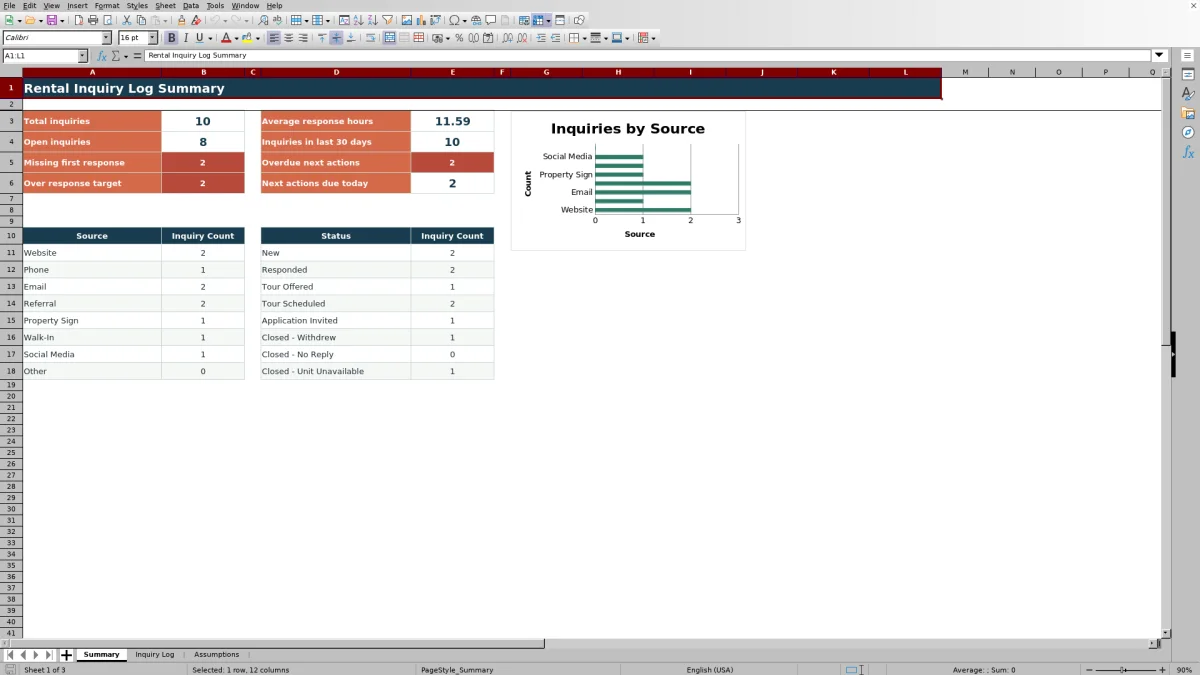
The XLSX includes a 100-row inquiry log, editable source-based response targets, operational check messages, and a summary of inquiry volume, response performance, statuses, and upcoming actions.
How this workbook can help
- Keeps prospect, property, unit, source, response, status, and follow-up details in one consistent log.
- Calculates elapsed response time and compares it with an editable target for each inquiry source.
- Identifies missing response details, overdue actions, actions due today, and incomplete follow-up entries.
- Summarizes leasing activity by source and status while displaying key response and follow-up metrics.
What is in the file
How to get started
1. Review the planning choices
Open the Assumptions sheet and confirm the available statuses, inquiry sources, response-hour targets, and permitted date range. Keep any closed status label beginning with “Closed” so the workbook classifies it correctly.
2. Enter each rental inquiry
Add one inquiry per row on the Inquiry Log sheet. Record the inquiry date and time, prospect, requested property and unit, source, preferred move-in date, and inquiry description.
3. Record the response and follow-up
Enter the first-response date and time, choose the current status, and add the next action and its due date. The calculated columns display response hours, the applicable target, and operational check messages.
4. Monitor the summary
Use the Summary sheet to review total and open inquiries, average response hours, recent inquiry volume, response exceptions, due actions, and inquiry counts by source and status.
Organize Prospective-Tenant Inquiries
The workbook provides one row per inquiry for capturing the inquiry ID, date and time, prospect name, property, unit, source, preferred move-in date, request details, status, and notes. This structure helps leasing staff keep the requested home and subsequent activity associated with the same record.
Filters across the full log make it possible to narrow the entries by property, source, status, due date, or another recorded field. Frozen headings keep the column labels visible while working farther down the 100-row entry area.
Measure First-Response Timing
The Inquiry Log calculates response hours from the recorded inquiry date and time to the first-response date and time. It then looks up the planning target assigned to the selected source on the Assumptions sheet.
The response check reports whether the entry is within target or needs attention because the response is missing, the chronology is negative, the source target cannot be found, or the elapsed time exceeds the target. The targets are editable internal planning values rather than guarantees or legal requirements.
Manage Statuses and Next Actions
Each open record can include a current status, a specific next action, and a due date. Formula-driven next-action checks identify missing action text, missing dates, overdue items, actions due today, scheduled actions, and records whose status begins with “Closed.”
The Summary sheet counts open inquiries, overdue actions, and actions due today. It also lists inquiry totals for each configured status, supporting routine follow-up without changing the underlying inquiry records.
Worked Rental Inquiry Scenario
Input: A fictional phone inquiry is entered for September 15, 2026 at 9:00 AM, with a first response recorded at 12:00 PM that day. The Phone source has an 8-hour target in the Assumptions sheet.
Result: Response Hours returns 3.00, Target Hours returns 8, and Response Check returns “Within target.”
Interpretation: The logged response occurred within the internal planning target assigned to phone inquiries.
Next decision: If the prospect wants to visit, select an appropriate tour status, enter the task needed to confirm the tour, and assign its due date so it appears in the follow-up checks.
Common Errors and Solutions
If Response Hours is blank, confirm that both inquiry date and time and both first-response date and time are present.
If the response chronology message appears, verify that the first-response date and time do not precede the inquiry date and time.
If the source-target message appears, select a source from the configured list or add the required source and target to the Assumptions sheet within the available source rows.
If an open inquiry lacks a usable follow-up check, enter both the next action and its due date.
If a completed inquiry is still counted as open, choose a configured status beginning with “Closed.”
Workbook and blank spreadsheet comparison
Use the prepared workbook when its verified fields and calculations fit the task. Start with a blank spreadsheet when you need to design a different model and can build and test every field and formula yourself.
| Method | Setup | Calculations and review | Practical fit |
|---|---|---|---|
| This Excel workbook | Use the prepared structure in the validated file | Review the documented calculations and results | Local editable workflow supported by the workbook |
| Blank spreadsheet | Create the structure yourself | Build and test every formula and check | A custom model built from scratch |
Workbook Limits and Planning Considerations
The Inquiry Log supports 100 entry rows, from row 5 through row 104. Dashboard formulas and calculated checks use that fixed range, so additional rows would require corresponding formula and range updates.
Response time is elapsed calendar time calculated from the entered dates and times; it does not exclude nights, weekends, or holidays. Date validation is configured from September 10, 2025 through September 9, 2028, and source targets are limited to the eight configured source rows.
Metrics involving recent inquiries and due dates use the current date through TODAY(), so results can change when Excel recalculates the workbook. The file records leasing activity and follow-up decisions; communication and appointment booking occur in the tools used by the property-management team.
Frequently asked questions
How many rental inquiries can the spreadsheet hold?
The prepared Inquiry Log contains 100 entry rows, covering rows 5 through 104. Its formulas, validation, filter range, and summary calculations are configured for those rows.
Can I change the inquiry sources and response targets?
Yes. The Assumptions sheet contains eight editable source entries and their target hours. Source selections in the Inquiry Log and the source summary are linked to those configured rows.
How does the workbook calculate response time?
It subtracts the combined inquiry date and time from the combined first-response date and time, then converts the difference to hours. All four date and time fields must be present for a result to appear.
What do the response and next-action messages mean?
They are operational prompts based on entered data, source targets, status text, due dates, and the current date. They can identify missing fields, inconsistent response chronology, responses over target, overdue actions, and actions due today; they are not official determinations.
Does the workbook include sample data?
Yes. It includes fictional sample inquiries that demonstrate source selection, response calculations, statuses, and follow-up entries. Replace or clear those records before using the workbook for current leasing activity.
Editorial responsibility

Marcus ReedLeasing and property workflows

Elena BrooksWorkbook logic and financial operations