The Tenant Screening Authorization Log for Excel is an XLSX workbook for recording applicant authorization status, provider request and response dates, reviewer responsibility, and administrative descriptions without documenting a screening decision.
The workbook includes a structured authorization log, calculated workflow indicators, a status chart, and editable assumptions for date limits, follow-up timing, properties, screening providers, reviewers, and authorization statuses.
How this workbook can help
- Keeps authorization status, provider activity, and reviewer responsibility in one structured log.
- Calculates turnaround days for completed and open provider requests.
- Flags missing required information and selected workflow inconsistencies with administrative prompts.
- Summarizes record volume, request activity, response completion, and authorization status.
What is in the file
How to get started
1. Update the assumptions and lists
Open the Assumptions sheet and replace the fictional properties, screening providers, and reviewers with the values used in your rental operations. Adjust the permitted date range and the follow-up threshold as needed.
2. Enter the authorization record
On the Authorization Log sheet, assign a log ID and enter the applicant reference, property, unit, authorization status, reviewer, and description. Add an authorization date when the status is Authorized.
3. Record provider activity
Select the screening provider, enter the provider request date, and add the response date when a response is received. Use the available drop-down lists and validated date fields for consistent entries.
4. Check workflow indicators
Review Turnaround Days and Human Check for each record, then use the Summary sheet to monitor requests, responses, open items, completion rate, average completed turnaround, and authorization-status counts.
What the Excel Authorization Log Records
This workbook supports the authorization workflow that can occur before and during a tenant screening provider request. Each record can include a log ID, applicant reference, property, unit, authorization status, authorization date, provider, request date, response date, reviewer, and administrative description.
The available authorization statuses are Not requested, Pending, Authorized, Declined, and Withdrawn. These values describe authorization activity rather than a rental application outcome.
Structured Entry and Workflow Controls
The Authorization Log provides 100 entry rows, covering rows 5 through 104. Property, authorization status, screening provider, and reviewer fields use lists maintained on the Assumptions sheet. Authorization, request, and response dates are limited by editable earliest and latest dates.
Filters cover all 13 log columns, and the header remains visible through the frozen pane at row 5. Turnaround Days and Human Check are calculated for every configured entry row.
Worked Tenant Screening Authorization Scenario
Input: A fictional applicant record is entered with Authorized status, an authorization date of August 21, 2026, a provider request date of August 22, and a provider response date of August 25.
Result: Turnaround Days calculates three days, and the record contributes to the authorized, provider-request, and provider-response counts on the Summary sheet.
Interpretation: The log shows that authorization and both provider dates were recorded, with three days between the request and response.
Next action: The property-management team can confirm that the administrative record is complete and continue its separate rental workflow without entering a screening decision in this workbook.
Common Entry Errors and Solutions
The Human Check column provides administrative prompts when required information is incomplete or when selected workflow entries need attention.
- If required fields are missing, complete the applicant reference, property, unit, authorization status, or reviewer.
- If Authorized is selected without an authorization date, enter the date or correct the status.
- If provider dates are present without a provider, select the applicable provider.
- If a response date is entered without a request date, add the request date or correct the response entry.
- If a response predates its request, correct the dates; the turnaround formula remains blank for that sequence.
- If provider activity appears with a status other than Authorized, check the status and provider dates for an entry error.
Summary Indicators and Follow-Up
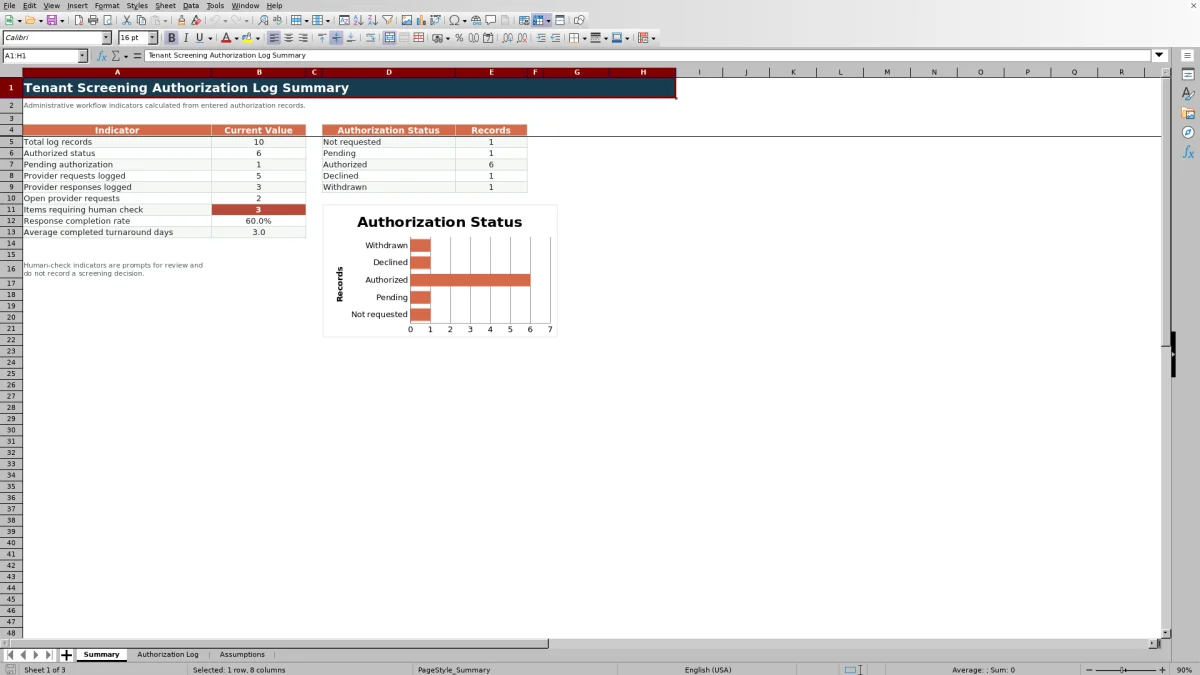
The Summary sheet reports total records, Authorized records, Pending records, provider requests, provider responses, open provider requests, items with a Human Check prompt, response completion rate, and average completed turnaround days.
A chart displays record counts for Not requested, Pending, Authorized, Declined, and Withdrawn. Open turnaround values use the current date, so they can change when Excel recalculates the workbook. The editable follow-up threshold is initially set to seven days and accepts whole numbers from 1 through 60.
Workbook and blank spreadsheet comparison
Use the prepared workbook when its verified fields and calculations fit the task. Start with a blank spreadsheet when you need to design a different model and can build and test every field and formula yourself.
| Method | Setup | Calculations and review | Practical fit |
|---|---|---|---|
| This Excel workbook | Use the prepared structure in the validated file | Review the documented calculations and results | Local editable workflow supported by the workbook |
| Blank spreadsheet | Create the structure yourself | Build and test every formula and check | A custom model built from scratch |
Workbook Limits and Administrative Scope
The configured log supports 100 records, and its validation lists must be updated when properties, providers, reviewers, or permitted dates change. The included names and records are fictional examples.
The workbook records authorization and provider workflow only. It has no field for a tenant screening decision, and its prompts do not represent an application outcome. Because open turnaround uses TODAY(), displayed days can change whenever the workbook recalculates.
Frequently asked questions
Which authorization statuses are available?
The Assumptions sheet lists Not requested, Pending, Authorized, Declined, and Withdrawn. The Authorization Log uses this list for its status drop-down.
How does the workbook calculate turnaround days?
Turnaround Days measures the number of days from the provider request date to the response date. If the response is still open, it uses the current date. It stays blank when the request date is missing or the response predates the request.
What does the Human Check column do?
It displays administrative prompts for missing required fields, missing authorization or provider information, absent request dates, and selected status or date inconsistencies. It does not record a screening decision.
Can the properties, providers, and reviewers be changed?
Yes. The Assumptions sheet contains visible lists for properties, screening providers, and reviewers, along with editable date limits and a follow-up threshold.
What information appears on the Summary sheet?
The Summary sheet shows total records, authorization counts, provider request and response counts, open requests, Human Check items, response completion rate, average completed turnaround days, and an authorization-status chart.
Editorial responsibility

Marcus ReedLeasing and property workflows

Elena BrooksWorkbook logic and financial operations