This Excel rental move-in cost calculator organizes the rent, deposits, charges, credits, and payments associated with a residential tenant’s move-in. The XLSX workbook calculates prorated rent, an optional separate first full month’s rent, total due before move-in, and the remaining balance.
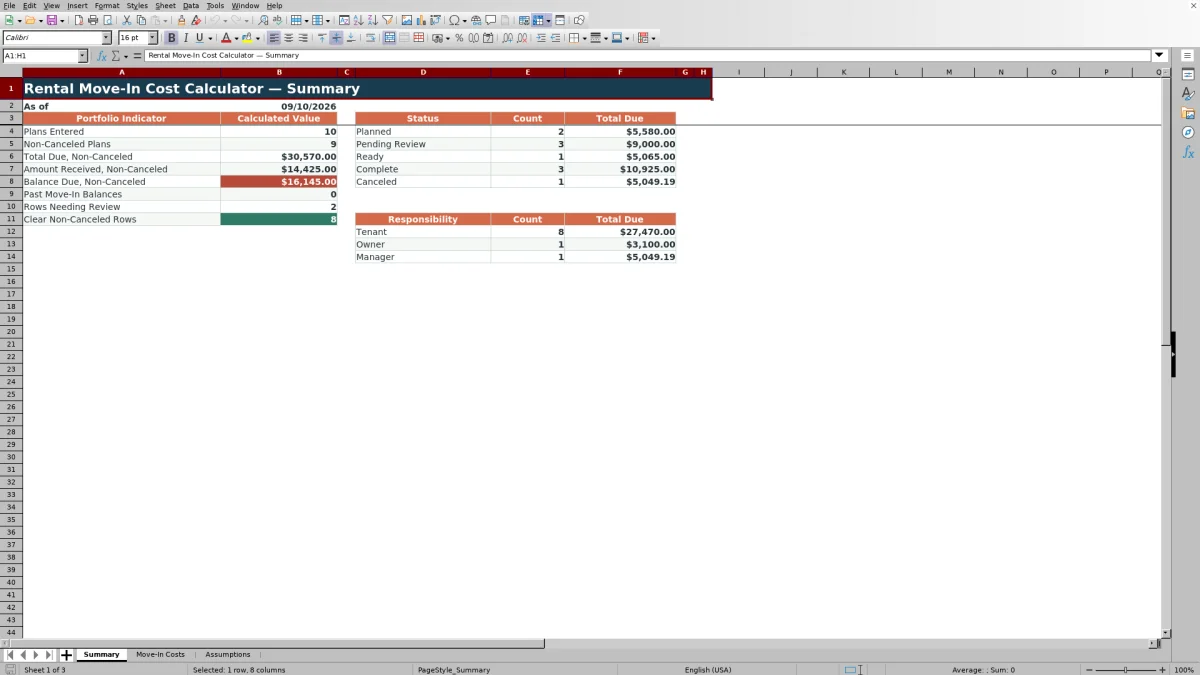
Property managers and leasing teams can maintain up to 100 move-in plans, assign responsibility, select a workflow status, and monitor portfolio totals from the Summary sheet. Editable assumptions provide three proration methods and operating limits for dates, monetary entries, and prorated-day overrides.
How this workbook can help
- Calculate the amount due before move-in from rent, deposits, charges, and credits.
- Choose actual-month, 30-day, or no-proration treatment for each move-in plan.
- Track amounts received and remaining balances across up to 100 plans.
- Monitor non-canceled totals, past move-in balances, statuses, responsibilities, and review alerts.
What is in the file
How to get started
1. Review the assumptions
Open the Assumptions sheet and confirm the available proration methods, accepted move-in date range, maximum amount entry, and maximum prorated-days override.
2. Enter the move-in details
On Move-In Costs, enter a unique tenancy ID, property, unit, move-in date, monthly rent, proration method, responsibility, and status. Use the yellow editable cells.
3. Add charges, credits, and payments
Indicate whether a separate first full month’s rent is due, then enter the security deposit, charge description, manager-entered charge, credits, and amount received.
4. Check calculations and alerts
Review prorated rent, total due before move-in, balance due, and the Review Alert column. Use the Summary sheet to monitor non-canceled totals and group results by status or responsibility.
What the calculator covers
The workbook provides space for 100 move-in plans, with one row for each tenancy. Editable fields cover the tenancy, property, unit, move-in date, monthly rent, proration selection, security deposit, manager-entered charge, credit, payment, responsibility, and status.
Calculated columns return prorated days, prorated rent, first full rent, total due before move-in, and balance due. The Summary sheet consolidates non-canceled amounts and also reports counts and total due by status and responsibility.
How the move-in calculations work
The spreadsheet supports three proration methods: actual days in the move-in month, a fixed 30-day month, and no proration. A prorated-days override can replace the default day count when appropriate for the lease terms.
- Prorated rent equals monthly rent multiplied by prorated days and divided by the applicable month divisor.
- First full rent equals one monthly rent amount when First Full Rent? is set to Yes; otherwise, it is zero.
- Total due combines prorated rent, first full rent, the security deposit, and manager-entered charges, then subtracts credits.
- Balance due subtracts the amount received from total due. Total due and balance due cannot fall below zero.
Worked move-in cost scenario
Inputs: Consider a fictional tenant moving in on September 15, 2026, with monthly rent of $1,850. The plan uses Actual Days in Move-In Month, includes a separate first full month’s rent, a $1,850 security deposit, a $150 manager-entered charge, a $100 credit, and $1,000 already received.
Result: September 15 through September 30 produces 16 prorated days. Prorated rent is $986.67, and total due before move-in is $4,736.67. After the $1,000 payment, the balance due is $3,736.67.
Interpretation: The balance includes both the partial September rent and a separate full month of rent because First Full Rent? was set to Yes. It also reflects the deposit, charge, credit, and payment.
Next decision: Confirm that the separate full month is required by the lease, resolve any Review Alert, and update the plan status before relying on the balance for move-in coordination.
Status, responsibility, and portfolio follow-up
Each plan can be assigned to Tenant, Owner, or Manager responsibility. Available statuses are Planned, Pending Review, Ready, Complete, and Canceled.
The Summary sheet reports plan counts and total due by status and responsibility. It separately shows plans entered, non-canceled plans, total due, amount received, balance due, past move-in balances, rows needing review, and clear non-canceled rows. Canceled plans are excluded from the primary non-canceled totals.
Workbook and blank spreadsheet comparison
Use the prepared workbook when its verified fields and calculations fit the task. Start with a blank spreadsheet when you need to design a different model and can build and test every field and formula yourself.
| Method | Setup | Calculations and review | Practical fit |
|---|---|---|---|
| This Excel workbook | Use the prepared structure in the validated file | Review the documented calculations and results | Local editable workflow supported by the workbook |
| Blank spreadsheet | Create the structure yourself | Build and test every formula and check | A custom model built from scratch |
Common errors and solutions
The Review Alert column helps identify row-level issues before a calculated amount is used.
- If the alert says required inputs are missing, complete the tenancy ID, property, unit, move-in date, monthly rent, proration method, first-full-rent selection, responsibility, and status.
- If a duplicate tenancy ID is reported, assign a unique ID to each move-in plan.
- If an entry is rejected, check the editable date, amount, or prorated-days limits on the Assumptions sheet.
- If the total appears to include too much rent, verify First Full Rent? Set it to Yes only when a separate full-month amount is due before move-in.
- If a canceled plan still requires operational attention, remember that canceled rows are excluded from the main non-canceled Summary totals.
Workbook limits and appropriate use
The Move-In Costs sheet contains 100 plan rows. Each row provides one charge description and one manager-entered charge amount, so multiple miscellaneous items must be combined into that amount if they belong to the same plan.
Default operating limits accept move-in dates from January 1, 2016, through December 31, 2036, monetary entries up to $100,000, and prorated-days overrides up to 31. These editable settings are stored on the Assumptions sheet.
The workbook does not calculate a negative total due or negative balance, so an excess payment is displayed as a zero balance rather than a credit balance. It also does not determine legal or tax requirements; lease terms and applicable local requirements still need to be checked.
Frequently asked questions
Which rent-proration methods are included?
The workbook includes Actual Days in Move-In Month, 30-Day Month, and No Proration. It also provides an optional prorated-days override.
How is the total due before move-in calculated?
Total due includes prorated rent, an optional separate first full month’s rent, the security deposit, and manager-entered charges, less any credits. The result is rounded to two decimal places and cannot be less than zero.
When should First Full Rent? be set to Yes?
Set it to Yes only when a separate full-month rent amount is due before move-in. The workbook adds that full monthly amount in addition to any prorated rent.
How many move-in plans can the Excel workbook track?
The Move-In Costs sheet provides 100 plan rows, covering rows 5 through 104. The Summary sheet consolidates counts and amounts from those rows.
What issues can the workbook flag for review?
The Review Alert column checks entered plan rows and includes alerts for missing required inputs and duplicate tenancy IDs. Input validation also limits accepted dates, amounts, prorated-day overrides, and list selections.
Editorial responsibility

Marcus ReedLeasing and property workflows

Elena BrooksWorkbook logic and financial operations