This tenant directory spreadsheet is an Excel workbook for maintaining property, unit, occupant, contact, lease, rent, balance, occupancy, and account information in one operational directory.
The XLSX includes 100 configured entry rows, formula-driven lease and review fields, validated status lists, editable assumptions, and a summary of key directory counts and amounts. Its included sample records are fictional and can be replaced with operational data.
How this workbook can help
- Keeps unit, tenant, contact, lease, rent, balance, and status details in one directory.
- Surfaces expiring leases, missing contact details, past-due accounts, and entries with review flags.
- Standardizes occupancy, account, and contact-responsibility entries through validated lists.
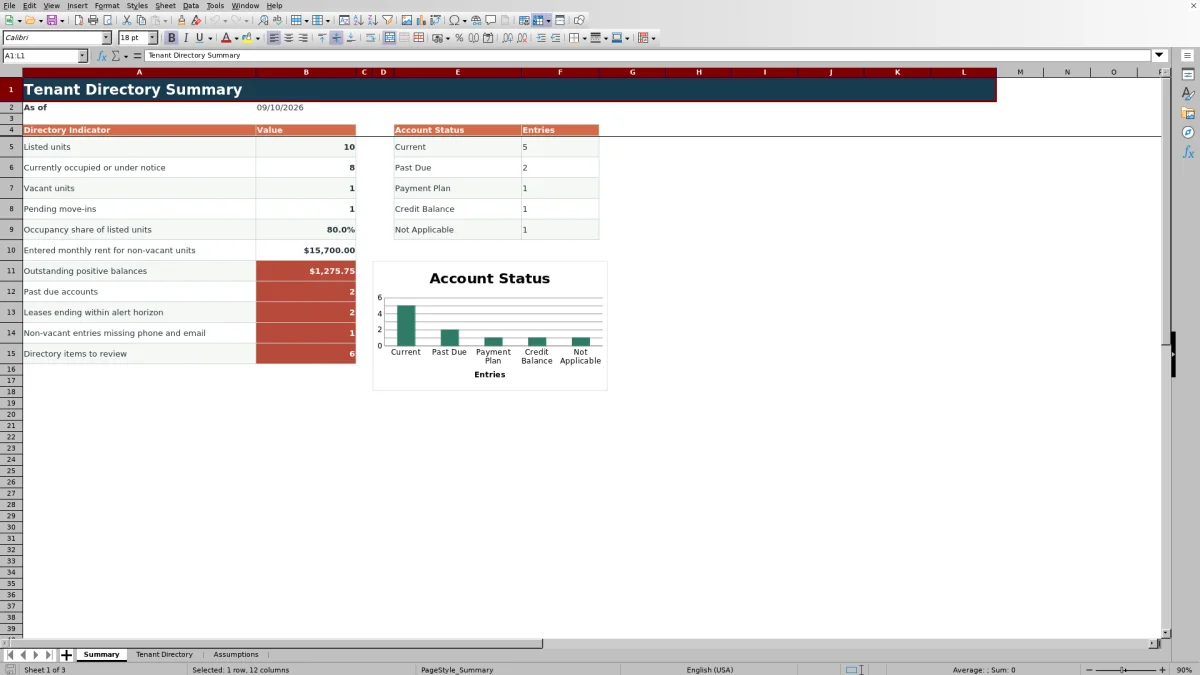
- Provides summary counts, amounts, occupancy share, and an account-status chart from entered records.
What is in the file
How to get started
Set the directory assumptions
Open the Assumptions sheet and confirm the 60-day lease alert horizon, accepted lease-date range, maximum rent, maximum balance magnitude, and available status lists.
Enter tenant and unit records
Replace the fictional examples in the yellow cells on the Tenant Directory sheet. Complete the property and unit fields, then add occupant, contact, lease, rent, balance, status, responsibility, and note details as applicable.
Check calculated fields and flags
Use Days to Lease End to identify approaching expirations. Resolve messages in Review Flag by completing missing unit, tenant, contact, or lease information.
Monitor the summary
Open the Summary sheet to view listed units, occupancy, vacancies, pending move-ins, entered rent, positive balances, past-due accounts, approaching lease expirations, missing contacts, and directory items to check.
What the tenant directory spreadsheet records
The Tenant Directory sheet uses a single directory layout for property, unit, primary tenant, other occupants, phone, email, lease dates, monthly rent, current balance, statuses, contact responsibility, and notes.
Rows 5 through 104 provide 100 configured entry rows. A row is counted as a listed unit when both its Property and Unit cells are populated. The final two columns calculate days to lease end and display a review flag when entered information needs attention.
Status lists and input controls
Controlled status entries help keep recurring values consistent throughout the directory and its summary formulas.
- Occupancy Status includes Occupied, Notice Given, Vacant, and Pending Move-In.
- Account Status includes Current, Past Due, Payment Plan, Credit Balance, and Not Applicable.
- Contact Responsibility includes Primary Tenant, Co-Tenant, Authorized Occupant, Property Contact, and Not Applicable.
Date validation references the earliest and latest accepted lease dates on the Assumptions sheet. Monthly rent and current balance entries also use the editable numeric limits stored there.
Worked tenant directory scenario
Input: Add a fictional record for Pine View, unit PV-204, with Taylor Example as the primary tenant, an Occupied status, a Past Due account status, a lease ending October 15, 2026, monthly rent of $1,800, and a positive balance of $250.
Result: If the workbook date is September 1, 2026, Days to Lease End returns 44. With the alert horizon set to 60 days, the row is included in the listed-unit, occupied, entered-rent, positive-balance, past-due, and approaching-lease-end summary results.
Interpretation: The directory shows that the occupied unit has both an approaching lease end and a positive balance associated with a Past Due status.
Next decision: Check the entered account and lease details, determine the appropriate operational follow-up, and update the record when the status or lease dates change.
Common errors and solutions
Flagged issues appear in the Review Flag column according to the values entered in each row.
- If Property or Unit is missing, complete the missing field to resolve Check unit details.
- If a non-vacant row has no primary tenant, enter the tenant name to resolve Add tenant name.
- If a non-vacant row has neither a phone number nor an email address, add an available contact method to resolve Add contact.
- If Lease End is earlier than Lease Start, or an Occupied row has a past lease end, correct the applicable date to resolve Check lease dates.
- If Excel rejects a date, rent, balance, or status entry, compare it with the accepted values on the Assumptions sheet.
Because the flag formula checks conditions in sequence, correcting one issue may reveal another issue in the same row.
Comparison with cloud property-management software
The complete Excel tenant directory workbook is more suitable when the immediate need is a file-based directory for up to 100 entries with fixed fields, editable assumptions, status validation, calculated lease timing, and a compact summary. A cloud property-management system may be more suitable when a selected service provides required multiuser access, permissions, or integrations; available capabilities depend on the product and configuration.
| Decision factor | Tenant directory Excel workbook | Cloud property-management system |
|---|---|---|
| Primary format | One XLSX file with Summary, Tenant Directory, and Assumptions sheets. | A hosted application accessed through the methods supported by the selected provider. |
| Configured capacity | 100 entry rows with formulas and validations through row 104. | Capacity varies by product, plan, and configuration. |
| Directory controls | Uses validated occupancy, account, and responsibility lists plus date and numeric limits. | Fields and validation rules vary by product and setup. |
| Operational output | Calculates lease timing and review flags, then summarizes directory counts, amounts, and account statuses. | Reports and alerts depend on the modules and settings supplied by the selected product. |
| Suitable operating context | A compact tenant and unit directory maintained in Excel. | An organization that requires capabilities available in a configured hosted system. |
Workbook limits and assumptions
The workbook is configured with 100 entry rows. Its directory formulas run through row 104, and the summary formulas reference that same range. Adding more entries requires extending the relevant formulas, validation, formatting, filter range, and summary references.
The initial assumptions accept lease dates from January 1, 2016, through December 31, 2036, monthly rent up to $50,000, and balances from negative $1,000,000 to positive $1,000,000. These limits are editable on the Assumptions sheet.
Calculated results depend on the entered values and the workbook's current date. Review flags identify internal data conditions but do not verify information against outside records.
Maintaining the directory over time
Use the filter on the Tenant Directory sheet to focus on a property, unit, occupancy status, account status, responsibility, or review flag. The frozen panes keep identifying columns and headers visible while navigating the directory.
After updating records, check the Summary sheet for changes in occupancy, balances, past-due accounts, lease expirations, missing contacts, and flagged items. If operating thresholds or status choices change, update the Assumptions sheet before entering new records so the validation lists and summary labels remain aligned.
Frequently asked questions
What information can I track in this tenant directory spreadsheet?
You can track property and unit identifiers, primary tenants, other occupants, phone numbers, email addresses, lease dates, monthly rent, current balances, occupancy status, account status, contact responsibility, and directory notes.
How many tenant or unit entries does the Excel workbook support?
The configured entry area supports 100 rows, from row 5 through row 104. The formulas, validation rules, filter, and summary references are set for that range.
How does the lease expiration alert work?
Days to Lease End subtracts the current date from the entered lease end date. The Summary sheet counts non-vacant entries ending between the current date and the editable lease alert horizon, which is initially set to 60 days.
Can I change the available occupancy and account statuses?
Yes. The status lists are stored on the Assumptions sheet and feed the Tenant Directory dropdowns. Update the lists carefully because the Summary formulas use the supplied status labels.
Does the workbook verify tenant, lease, or account information against other systems?
No. Its calculations and flags use only the values entered in the workbook. Review flags identify internal conditions such as missing unit details, missing contacts, or inconsistent lease dates, but they do not verify outside records.
Editorial responsibility

Marcus ReedLeasing and property workflows

Elena BrooksWorkbook logic and financial operations