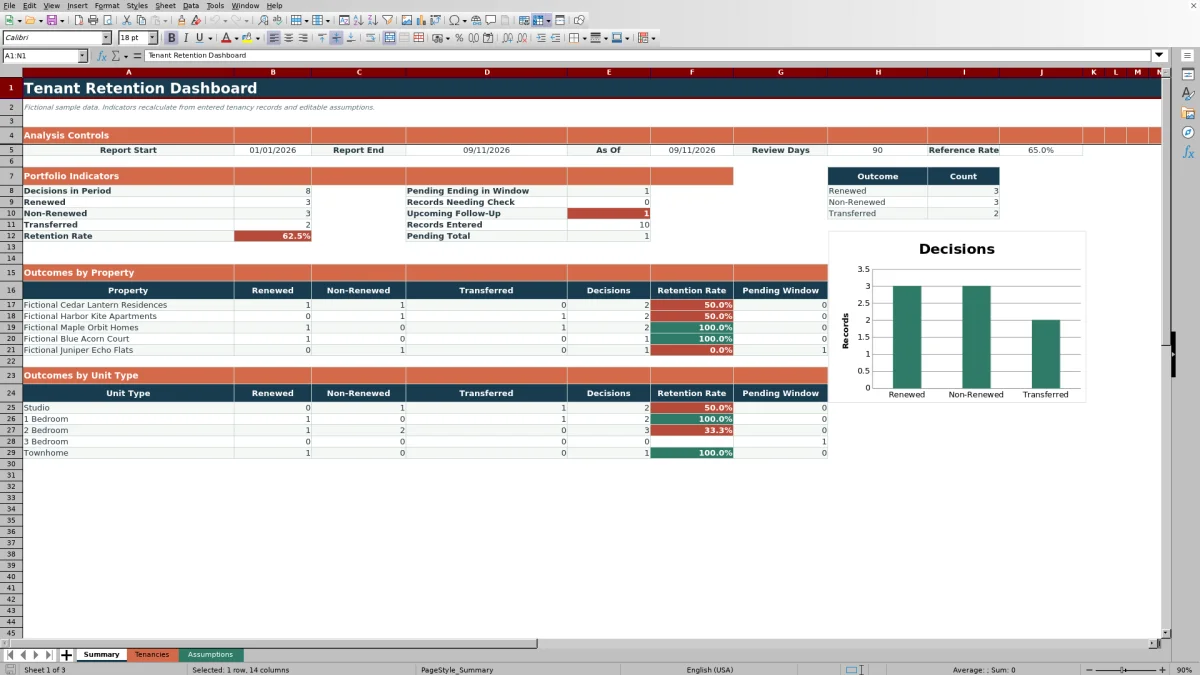
This Tenant Retention Dashboard is an Excel workbook for monitoring renewed, non-renewed, transferred, and pending tenancies across a selected reporting period. It summarizes completed decisions by property and unit type while separately identifying pending leases within an upcoming review window.
The XLSX includes a 100-row tenancy register, editable reporting assumptions, calculated retention classifications, review alerts, portfolio indicators, and an outcome chart. Fictional sample records demonstrate the workflow and can be replaced with operational tenancy data.
How this workbook can help
- Track completed tenancy decisions and pending lease-end reviews in one workbook.
- Measure retention using renewed and transferred outcomes relative to all completed decisions in the reporting period.
- Compare outcomes by property and unit type to identify where follow-up may be needed.
- Surface duplicate IDs, missing inputs, date conflicts, and other record issues before relying on the summary.
What is in the file
How to get started
1. Set the reporting controls
On the Assumptions sheet, enter the report start and end dates, as-of date, review-window days, and reference retention threshold.
2. Confirm the available choices
Review the fictional property, unit-type, and outcome lists on the Assumptions sheet. These lists supply the validated choices on the Tenancies sheet.
3. Enter tenancy records
Add one tenancy per row on the Tenancies sheet. Use a unique record ID and complete the property, unit, unit type, lease dates, outcome, and applicable decision, effective, or transfer details.
4. Resolve alerts and review results
Correct any issues shown in the Review Alert column, then use the Summary sheet to review portfolio totals, retention rates, pending lease-end reviews, and property or unit-type results.
What the Tenant Retention Dashboard Tracks
The workbook separates completed outcomes from pending lease reviews. Completed outcomes include Renewed, Non-Renewed, and Transferred, while Pending remains outside the completed-decision total.
- Portfolio indicators show decision counts, retention rate, pending reviews, entered records, and records needing checks.
- Property and unit-type sections show renewed, non-renewed, transferred, total decisions, retention rate, and pending-window counts.
- The outcome chart compares the three completed outcome categories.
Reporting Period and Retention Logic
The Decision Date determines whether a renewed, non-renewed, or transferred record is included between the report start and report end dates. The Period Flag identifies qualifying completed records.
Pending monitoring instead uses Lease End. A pending record is counted in the review window when its lease ends from the as-of date through the as-of date plus the selected number of review days.
The retention rate equals renewed plus transferred decisions divided by all renewed, non-renewed, and transferred decisions in the period. The workbook therefore classifies both renewed and transferred outcomes as retained.
Worked Tenant Retention Scenario
Input: Suppose Fictional Cedar Lantern Residences has six completed decisions dated from January 1 through September 11, 2026: three renewed, two non-renewed, and one transferred. A separate pending tenancy has an October 31, 2026 lease end. The as-of date is September 11 and the review window is 90 days.
Result: The property row reports six decisions and a 66.7% retention rate because four retained outcomes are divided by six completed decisions. The pending tenancy is counted once in the pending window because October 31 falls within 90 days after September 11.
Interpretation: Four of the six completed decisions retained the tenancy relationship, while the pending lease remains a separate follow-up item rather than a completed outcome.
Next decision: Review the property and unit-type rows for the completed outcomes, follow up on the pending lease before its end date, and update its outcome, Decision Date, and Effective Date after a decision is made.
Common Errors and Solutions
- Duplicate tenancy ID: assign a unique Tenancy Record ID to each row.
- Missing required input: complete the property, unit, unit type, lease start, lease end, and outcome fields.
- Lease End before Lease Start: correct the lease dates so the end is not earlier than the start.
- Effective Date before Decision Date: verify both dates and correct the inconsistent entry.
- Completed outcome without decision or effective dates: enter the applicable dates, or keep the outcome Pending until a decision exists.
- Unexpected summary count: confirm that the outcome uses an available list value and that the Decision Date falls inside the selected reporting period.
Excel Workbook and Manual CSV Comparison
This comparison considers the complete operational workbook against a manual CSV tenancy register followed by a separately prepared report.
| Consideration | Tenant Retention Dashboard Excel workbook | Manual CSV register and separate report |
|---|---|---|
| Data entry | Provides prepared fields, outcome lists, property and unit-type choices, and date validation. | Stores plain row data, but entry controls depend on the application or process used to edit the CSV. |
| Calculations | Includes formulas for period flags, retention classes, alerts, totals, rates, and pending-window counts. | Requires calculations to be created in another spreadsheet, reporting tool, or manual process. |
| Operational review | Includes a Summary sheet, property and unit-type breakdowns, portfolio indicators, and an outcome chart. | Requires a separate report to organize and present comparable results. |
| Record checks | Flags duplicate IDs, missing required inputs, and specified date conflicts in prepared rows. | Requires separate checks or manual review rules. |
| Prepared capacity | Contains formulas and validation for 100 tenancy-entry rows. | Can contain additional rows, but the CSV itself does not retain workbook formulas, validation, or charts. |
The Excel workbook is more suitable when a property-management team needs a structured 100-row register and repeatable summary calculations in one file. A CSV may be suitable when plain-text data exchange is the primary need and reporting will be performed in another system.
Workbook Limits and Boundaries
The Tenancies sheet has 100 prepared entry rows, from row 5 through row 104. Entries beyond that range are not included in the existing summary formulas unless the workbook ranges, formulas, and validation are extended.
The initial choice ranges contain five fictional properties, five unit types, and four outcomes. Property and unit-type summary rows correspond to those listed choices, so list changes may also require updates to the related summary layout and formulas.
The reference retention threshold is an editable visual-review level, not a forecast or guarantee. Results also depend on complete, consistently entered dates and outcome values.
Recommended Operating Routine
- Set the reporting period and as-of date before reviewing results.
- Add or update tenancy records as decisions occur.
- Resolve Review Alert messages before using the reported counts.
- Use pending-window counts to organize upcoming lease-end follow-up.
- Review portfolio, property, and unit-type results together so the total and underlying categories remain connected.
Because completed decisions and pending reviews use different date fields, maintain Decision Date for decided outcomes and Lease End for pending follow-up.
Frequently asked questions
Which tenancy outcomes count as retained?
Renewed and Transferred outcomes count as retained. The retention rate divides those two categories by all Renewed, Non-Renewed, and Transferred decisions in the selected reporting period.
Which date controls inclusion in the reporting period?
Decision Date controls whether a completed Renewed, Non-Renewed, or Transferred outcome is included between the report start and report end dates.
How does the pending review window work?
A tenancy with a Pending outcome is counted when its Lease End falls from the as-of date through the as-of date plus the selected review-window days.
How many tenancy records can the workbook hold without extending its prepared ranges?
The Tenancies sheet contains 100 prepared entry rows, covering rows 5 through 104. The formulas, validations, and summary references use that range.
What issues can the Review Alert column identify?
The prepared formulas can identify duplicate tenancy IDs, missing required inputs, a Lease End before Lease Start, an Effective Date before Decision Date, completed outcomes missing applicable dates, and pending records requiring upcoming lease-end follow-up.
Editorial responsibility

Marcus ReedLeasing and property workflows

Elena BrooksWorkbook logic and financial operations