The Lease Signing Tracker Spreadsheet for Excel is an XLSX workbook for tracking long-term residential lease packets from document delivery through resident signature, countersignature, copy delivery, and completion.
Enter lease details and milestone dates for up to 100 records. The workbook calculates each record’s status, completion date, days open, and follow-up check while summarizing signing stages and workload on a separate dashboard.
How this workbook can help
- See each lease packet’s current stage from documents sent through copy delivery.
- Measure completion volume, open workload, completion rate, and days open from entered dates.
- Flag missing property, unit, or tenancy details and milestone dates that are out of sequence.
- Assign one of four responsibility choices and filter the 100-row tracking range.
What is in the file
How to get started
1. Set the planning limits
Open the Assumptions sheet. Keep or adjust the completion target, signature-stage warning, and upcoming-start horizon using whole numbers from 0 through 365.
2. Enter the lease record
On the Lease Tracker sheet, enter the property, unit, tenancy, lease start, responsibility, and any useful description or notes.
3. Record each signing milestone
Add the dates for Documents Sent, Resident Signed, Countersigned, and Copy Delivered as each event occurs. The available date fields accept dates within the workbook’s validated range.
4. Review calculated results
Use Completion Date, Days Open, Status, and Follow-Up Check to identify the next task. Filter the tracker as needed, then open the Summary sheet to review totals, stage counts, timing indicators, and upcoming starts.
Follow each lease packet through its signing stages
Each Lease Tracker row follows a consistent milestone sequence: Documents Sent, Resident Signed, Countersigned, and Copy Delivered. Separate columns also identify the property, unit, tenancy, lease start, responsible party, and notes.
- Missing property, unit, or tenancy information produces a Record incomplete status.
- A populated record without a Documents Sent date is marked Not sent.
- Later statuses progress through Awaiting resident, Awaiting countersignature, Copy due, and Complete.
Use calculated timing and summary indicators
The formula-driven status reflects the milestone dates entered on each populated row. Completion Date appears when all four signing milestones are present, and Days Open measures calendar days from Documents Sent to completion or to today for an unfinished record.
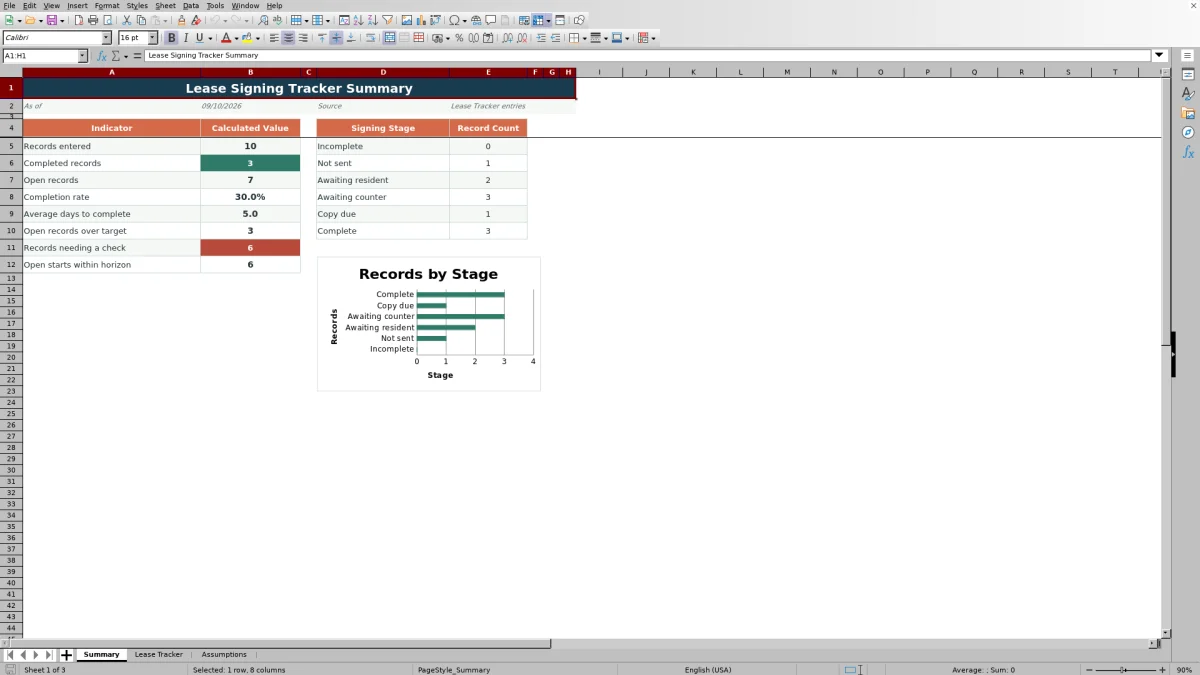
The Summary sheet counts records entered, completed records, open records, records over the completion target, records needing a check, and open leases starting within the selected horizon. It also calculates completion rate and average days to complete and displays a chart of stage counts.
Worked lease signing scenario
Input: A fictional Juniper House lease has a Documents Sent date of August 21, 2026, a Resident Signed date of August 23, a Countersigned date of August 24, and a Copy Delivered date of August 25.
Result: The workbook returns August 25, 2026 as the Completion Date, calculates 4 Days Open, and assigns Complete as the status.
Interpretation: All four milestones are present, and the packet was completed within the default 5-calendar-day completion target.
Next decision: No remaining signing stage is due for that record, so attention can shift to rows that are awaiting a signature, countersignature, or delivered copy.
Common entry errors and solutions
The Follow-Up Check column surfaces several data problems that can affect the calculated workflow. Fix the source dates or missing identifiers rather than changing the calculated result.
- If property, unit, or tenancy is blank, add the missing identifier to clear the incomplete-record check.
- If Resident Signed is entered without Documents Sent, add the actual sent date or clear the misplaced signature date.
- If a later milestone is dated before the preceding milestone, verify and correct the affected dates.
- If an assumption value is rejected, enter a whole number from 0 through 365.
Workbook and blank spreadsheet comparison
Use the prepared workbook when its verified fields and calculations fit the task. Start with a blank spreadsheet when you need to design a different model and can build and test every field and formula yourself.
| Method | Setup | Calculations and review | Practical fit |
|---|---|---|---|
| This Excel workbook | Use the prepared structure in the validated file | Review the documented calculations and results | Local editable workflow supported by the workbook |
| Blank spreadsheet | Create the structure yourself | Build and test every formula and check | A custom model built from scratch |
Understand the workbook limits
The included 100-record range runs from rows 5 through 104. Formulas, validation, conditional formatting, and summary references are configured for that range.
- The workbook records milestone dates but does not send documents, collect signatures, or deliver copies.
- Days Open and the upcoming-start indicator use TODAY(), so results can change when Excel recalculates on a later date.
- The three assumption values are operational planning inputs and do not establish what occurred on a lease record.
- Follow-Up Check messages identify defined data conditions but do not correct the underlying entries.
Filter records and plan the next action
The Lease Tracker includes filters across Property through Description / Notes. Filter by Status to isolate packets that are Not sent, Awaiting resident, Awaiting countersignature, or Copy due, or filter by Responsibility to group work assigned to Resident, Property Manager, Owner, or Joint Review.
Use the Summary sheet to compare open workload with completed volume, identify records over the selected completion target, and find open leases beginning within the upcoming-start horizon. These results support the next operational decision without replacing the dates and notes entered on the tracker.
Frequently asked questions
How many lease records does the Excel tracker support?
The included tracking area supports 100 lease records in rows 5 through 104. Calculated columns, validations, conditional formatting, filters, and summary formulas are configured for this range.
How does the workbook determine a lease signing status?
Status is calculated from the property, unit, tenancy, and milestone fields. A populated record moves from Record incomplete or Not sent through Awaiting resident, Awaiting countersignature, Copy due, and Complete as the required information and dates are entered.
How are Completion Date and Days Open calculated?
Completion Date appears after Documents Sent, Resident Signed, Countersigned, and Copy Delivered all contain dates. Days Open measures calendar days from Documents Sent to Completion Date, or from Documents Sent to today while the record remains unfinished.
Can the timing assumptions and responsibility choices be changed?
Yes. The Assumptions sheet contains editable values for the completion target, signature-stage warning, and upcoming-start horizon. It also supplies the Resident, Property Manager, Owner, and Joint Review choices used by the responsibility dropdown.
What information appears on the Summary sheet?
The Summary sheet shows records entered, completed and open records, completion rate, average days to complete, open records over target, records needing a check, and open starts within the selected horizon. It also counts each signing stage and displays those counts in a chart.
Editorial responsibility

Marcus ReedLeasing and property workflows

Elena BrooksWorkbook logic and financial operations