This rental parking assignment register is an Excel workbook for connecting parking spaces, permits, and vehicles with rental units and tenant or household records. Each assignment can include start and end dates, permit responsibility, and an assignment status.
The XLSX spreadsheet also maintains a parking space register, calculates availability as of a selected review date, identifies assignments ending within a chosen window, and summarizes activity by property.
How this workbook can help
- Keep unit, tenant or household, space, permit, vehicle, and assignment dates in one operational register.
- See active, scheduled, and ending-soon assignment counts based on the selected review date.
- Track in-service, assigned, available, and out-of-service spaces by property.
- Surface missing fields, inconsistent dates or statuses, unlisted spaces, service conflicts, and multiple active assignments.
What is in the file
How to get started
1. Configure the assumptions
Set the review date and the number of days used for the ending-soon window. Update the property entries and stable lists when your operating process changes.
2. Build the parking space register
List each parking space once on the Spaces sheet. Enter its property, space identifier, description, and service status.
3. Enter parking assignments
Use the Assignments sheet to record the assignment ID, property, unit, tenant or household, parking space, permit, vehicle, start date, optional end date, permit responsibility, and assignment status.
4. Use the calculated outputs
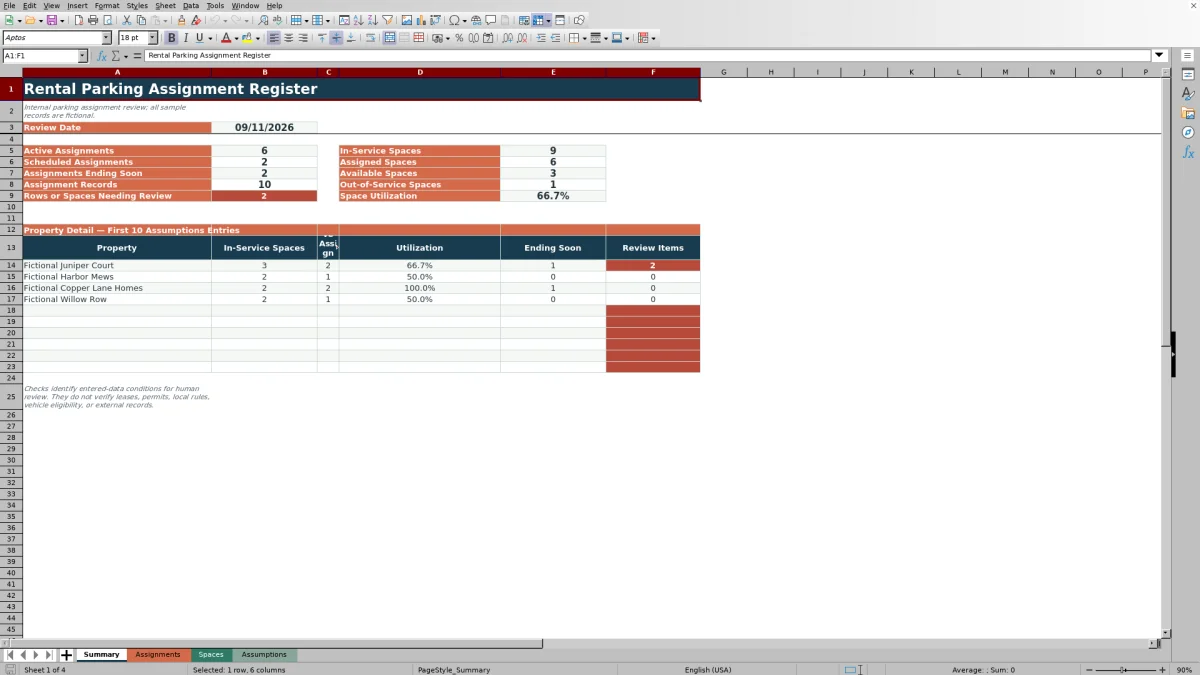
Check the Date Check, Space Check, Follow-Up, and calculated availability columns for data conditions that need correction. Use the Summary sheet to view assignment counts, space counts, utilization, ending-soon records, and property-level results.
What the rental parking register records
The Assignments sheet uses one assignment per row to connect a property and rental unit with a tenant or household, parking space, permit, and vehicle. Start and end dates establish the assignment period, while permit responsibility and assignment status describe how the record is being managed.
Prepared columns also return date checks, space checks, and follow-up labels without changing the source details entered for the assignment.
How review dates affect assignment results
The review date on the Assumptions sheet drives active assignment counts and current space availability. The separate ending-soon setting defines how many days beyond that date are included in the ending-soon count.
The available assignment statuses are Active, Scheduled, Ended, and On Hold. Formula checks can flag a status that does not align with the entered start date, end date, and review date.
How parking space availability is calculated
Each physical parking space is listed once on the Spaces sheet with a property, identifier, description, and service status. The workbook counts active assignments that match both the property and parking space as of the review date.
For an in-service space, calculated availability is Assigned when the active count is greater than zero and Available when the count is zero. An out-of-service space returns Out of Service. Additional checks identify multiple active assignments and service-status conflicts.
Worked rental parking assignment scenario
Input: A fictional assignment for SAMPLE-JC-02 at Fictional Juniper Court starts June 13, 2026, ends October 1, 2026, and has an Active status. The review date is September 11, 2026, and the ending-soon window is 30 days.
Result: The assignment is active on the review date and ends 20 days later, so it contributes to both Active Assignments and Assignments Ending Soon. Because SAMPLE-JC-02 is in service and has one active assignment, its calculated availability is Assigned.
Interpretation: The space is currently occupied, and its assignment is approaching the entered end date.
Next decision: Determine whether the assignment should end on October 1 or whether its dates and status should be updated for the next parking arrangement.
Common errors and solutions
- Missing assignment details can produce CHECK REQUIRED FIELDS. Complete the property, unit, tenant or household, parking space, start date, permit responsibility, and assignment status.
- An end date earlier than the start date produces CHECK END DATE. Correct the date sequence.
- An Active or Scheduled status that conflicts with the review date can produce CHECK STATUS / DATES. Update the status or the applicable dates.
- A property and space combination not found on the Spaces sheet can produce CHECK SPACE LIST. Correct the identifiers or add the space to the register.
- An assignment involving an out-of-service space can produce CHECK SPACE SERVICE. Correct the assignment or the space service status as appropriate.
- Overlapping active records for the same property and space can trigger a multiple-assignment check. Inspect the applicable assignment periods and correct the conflicting entry.
Workbook and blank spreadsheet comparison
Use the prepared workbook when its verified fields and calculations fit the task. Start with a blank spreadsheet when you need to design a different model and can build and test every field and formula yourself.
| Method | Setup | Calculations and review | Practical fit |
|---|---|---|---|
| This Excel workbook | Use the prepared structure in the validated file | Review the documented calculations and results | Local editable workflow supported by the workbook |
| Blank spreadsheet | Create the structure yourself | Build and test every formula and check | A custom model built from scratch |
Workbook limits and maintenance considerations
Formula checks evaluate the data entered in the workbook. They do not verify leases, permits, vehicle eligibility, or external records. Results depend on accurate property names, space identifiers, dates, service statuses, and assignment statuses.
The prepared Assignments and Spaces areas each contain 100 rows. Property detail on the Summary sheet covers the first 10 property entries from the Assumptions sheet. The workbook contains no charts or Excel tables.
Frequently asked questions
What information can I record for each parking assignment?
You can record an assignment ID, property, unit, tenant or household, parking space, permit ID, vehicle description, vehicle identifier, start date, end date, permit responsibility, and assignment status.
How does the workbook determine whether a parking space is available?
It counts Active assignments matching the property and parking space whose dates include the selected review date. An in-service space with an active count is marked Assigned, while an in-service space with no active count is marked Available.
Can the register track future and ending-soon assignments?
Yes. Scheduled assignments are counted on the Summary sheet, and Active assignments with end dates inside the configured ending-soon window are identified as ending soon.
How many assignment and parking space rows are prepared?
The Assignments sheet has 100 prepared record rows, and the Spaces sheet has 100 prepared parking-space rows.
Are the included property, tenant, vehicle, permit, and space records real?
No. The included sample records are fictional and are intended to demonstrate the workbook structure and calculations.
Editorial responsibility

Marcus ReedLeasing and property workflows

Elena BrooksWorkbook logic and financial operations