The Rental Storage Assignment Register is an Excel workbook for linking storage lockers or other storage spaces to rental units and tenant or tenancy records. It keeps assignment dates, keys, monthly charges, responsibility, and status together in one operational register.
The XLSX includes editable assumptions, 100 assignment rows, calculated occupancy and key fields, review flags, and a summary of statuses, charges, capacity, and property-level activity. Fictional sample data should be replaced before use.
How this workbook can help
- Keeps storage assignments, rental units, tenants, dates, keys, charges, and statuses in one register.
- Shows outstanding keys and date-sensitive active monthly charges without separate calculations.
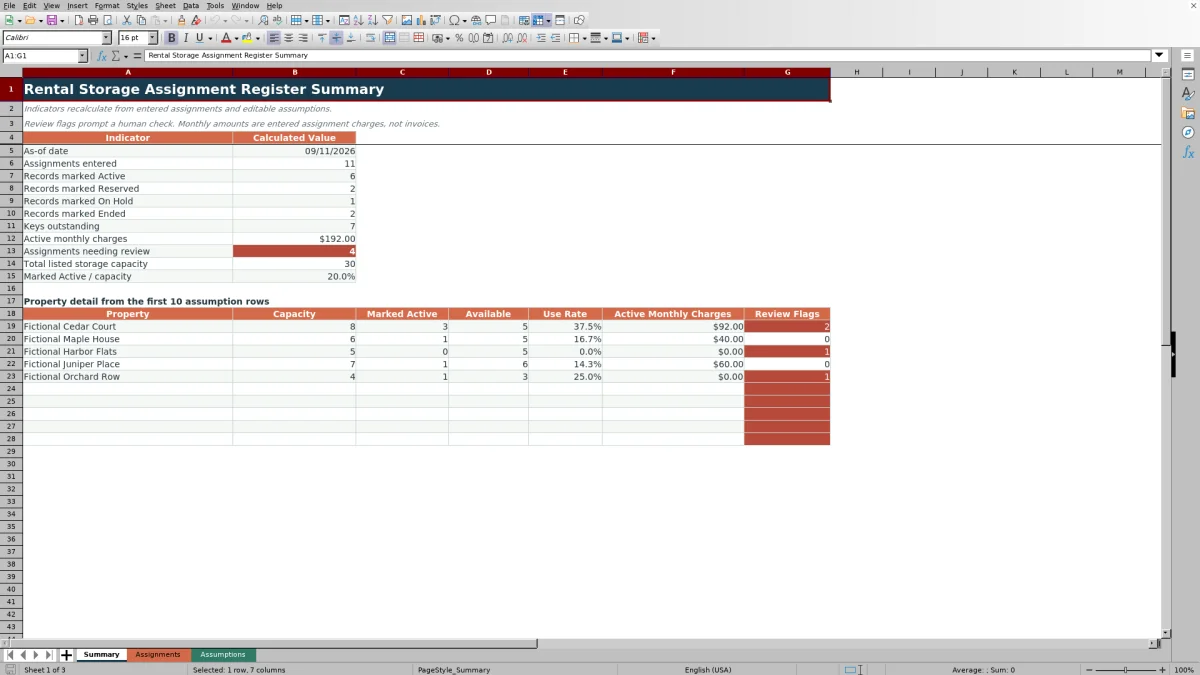
- Summarizes assignment statuses, listed capacity, availability, use rates, charges, and review flags.
- Uses validation and formula-based flags to identify incomplete or inconsistent entries.
What is in the file
How to get started
Set the as-of date and property capacities
Open the Assumptions sheet, update the as-of date, and replace the fictional property names and planning capacities with the properties covered by the register.
Replace the fictional assignment records
Open the Assignments sheet and overwrite the sample data in the input columns from Assignment ID through Status. Keep the formulas in Occupied Days, Keys Outstanding, Active Monthly Charge, and Review Flag.
Enter and maintain each assignment
Use a unique assignment ID, select the applicable status and responsibility, and record the rental unit, tenant or tenancy, storage location, dates, key counts, and monthly charge.
Check calculated results and summary totals
Resolve entries marked with a Check flag, then use the Summary sheet to monitor statuses, outstanding keys, active monthly charges, listed capacity, and property-level activity.
What the rental storage register tracks
Each single assignment row connects an assignment ID with a property, rental unit, tenant or tenancy, storage area, and storage-space identifier. Start and end dates establish the assignment period, while key counts, monthly charge, responsibility, and status document the current arrangement.
The available status choices are Active, Reserved, On Hold, and Ended. Responsibility can be assigned to the Tenant, Property, or Shared category.
Calculated fields and portfolio summary
The editable as-of date controls occupied-day and active-charge calculations. Occupied Days counts from the start date through the earlier of the end date or as-of date, including both endpoints. Keys Outstanding subtracts returned keys from issued keys without producing a negative result.
The property-level view shows capacity, records marked Active, calculated availability, use rate, active monthly charges, and review-flag counts for the first 10 properties entered in Assumptions. Portfolio indicators also total assignments, statuses, keys, charges, review flags, and listed capacity.
Worked storage assignment scenario
Input: Fictional Cedar Court has a planning capacity of 8 and an as-of date of September 11, 2026. A fictional Active assignment starts September 1, has no end date, shows 2 keys issued and 1 returned, and carries a $45 monthly charge. Assume the property has 3 records marked Active in total.
Result: The assignment row returns 11 occupied days, 1 outstanding key, and a $45 active monthly charge. The property summary shows 3 marked Active, 5 available, and a 37.5% use rate.
Interpretation: One key remains outstanding, the assignment qualifies for the date-sensitive active charge, and the property remains below its entered planning capacity.
Next decision: Confirm the outstanding key status and decide whether one of the 5 calculated available spaces can support another assignment.
Common errors and solutions
- If required fields are blank, complete the assignment ID, property, rental unit, tenant or tenancy, storage area, storage space, start date, responsibility, and status.
- If a property-list flag appears, make the property entry match a name on the Assumptions sheet or add the property and its planning capacity there.
- If an assignment-ID flag appears, replace the duplicate with a unique identifier.
- If a date flag appears, enter valid Excel dates and make sure the end date is not earlier than the start date.
- If an input is rejected, use nonnegative whole numbers for key counts and a nonnegative number for the monthly charge.
Ongoing property-management workflow
Update a row when keys are issued or returned, an assignment changes status, responsibility changes, or an end date becomes known. Filters on the Assignments sheet can isolate a property, status, responsibility category, or flagged record.
Keep the as-of date current for the reporting period. Because status totals and date-sensitive active charges answer different questions, reconcile unexpected differences by checking both the Status field and the assignment dates.
Comparison with a separate paper storage log
The Excel workbook is more suitable when a property team needs calculated totals, filters, standardized choices, and a consolidated capacity view. A separate paper locker and key log may be more suitable when staff need a temporary offline sign-out record and do not require automated calculations.
| Consideration | Excel assignment register | Separate paper locker and key log |
|---|---|---|
| Record structure | Uses consistent columns for assignments, units, tenants or tenancies, dates, keys, charges, responsibility, and status. | Structure depends on the fields printed or written on each page. |
| Calculations | Calculates occupied days, outstanding keys, active monthly charges, capacity availability, and use rates. | Requires manual calculations or a separate summary process. |
| Finding records | Provides an assignment-sheet filter across 100 prepared rows. | Requires reading, indexing, or sorting physical pages. |
| Input controls | Includes list, date, whole-number, and decimal validation for designated fields. | Relies on written instructions and consistent data entry. |
| Suitable operating condition | More suitable when current totals and property-level capacity indicators are needed in one file. | More suitable when a short-term offline record is sufficient and no automated reporting is needed. |
Workbook limits and appropriate use
The register has 100 prepared assignment rows. The Assumptions sheet supports up to 100 property-capacity entries, but the property detail on Summary displays only the first 10 property rows.
- Entered capacities are internal planning inputs, not official limits.
- Monthly amounts are assignment charges, not invoices.
- The property field has no dropdown; its review formula checks whether the entered name appears in Assumptions.
- Marked Active counts are status-based, while Active Monthly Charge also tests whether the assignment dates include the as-of date.
- The workbook contains no charts or structured Excel tables.
Frequently asked questions
What information does the rental storage assignment register track?
It tracks assignment IDs, properties, rental units, tenants or tenancies, storage areas and spaces, start and end dates, keys issued and returned, monthly charges, responsibility, and status.
How does the workbook calculate occupied days?
Occupied Days runs from the start date through the earlier of the end date or the editable as-of date, including both dates. The result cannot be less than zero.
When is a monthly charge counted as active?
The entered monthly charge is counted when the record is marked Active and its start and end dates include the as-of date. Otherwise, Active Monthly Charge returns zero.
How many assignments and properties can the workbook hold?
The Assignments sheet has 100 prepared data rows, and the Assumptions sheet has room for 100 property-capacity entries. The Summary sheet displays property detail for the first 10 assumption rows.
Does the Excel register create invoices?
No. The workbook records assignment-level monthly charges and summarizes active amounts, but those amounts are not invoices.
Editorial responsibility

Marcus ReedLeasing and property workflows

Elena BrooksWorkbook logic and financial operations