This rental leasing conversion dashboard is an Excel workbook for measuring how entered inquiries progress to showings, applications, and signed leases. It calculates conversion from each prior funnel stage and provides results by property and lead channel.
The XLSX includes a filterable summary, a prepared input area for 100 fictional leasing lead records, and editable assumptions for properties, channels, statuses, responsibilities, and accepted date limits.
How this workbook can help
- See inquiry-to-showing, showing-to-application, and application-to-lease conversion in one dashboard.
- Filter entered lead records by inquiry-date range, property, and channel.
- Compare funnel counts and conversion rates across configured properties and lead channels.
- Identify records flagged for duplicate IDs, missing inputs, milestone-date issues, or inconsistent lease information.
What is in the file
How to get started
Set the workbook assumptions
Open the Assumptions sheet and update the accepted date limits and lists for properties, channels, statuses, and leasing responsibilities.
Enter leasing lead records
Use rows 4 through 103 on the Leads sheet. Enter a unique lead ID, property, inquiry date, channel, responsibility, and status, then add showing, application, and lease dates as milestones occur.
Resolve funnel-check messages
Read the Funnel Check column for each populated row. Correct duplicate lead IDs, missing required inputs, out-of-order milestone dates, or lease information that does not align with the selected status.
Filter and interpret the dashboard
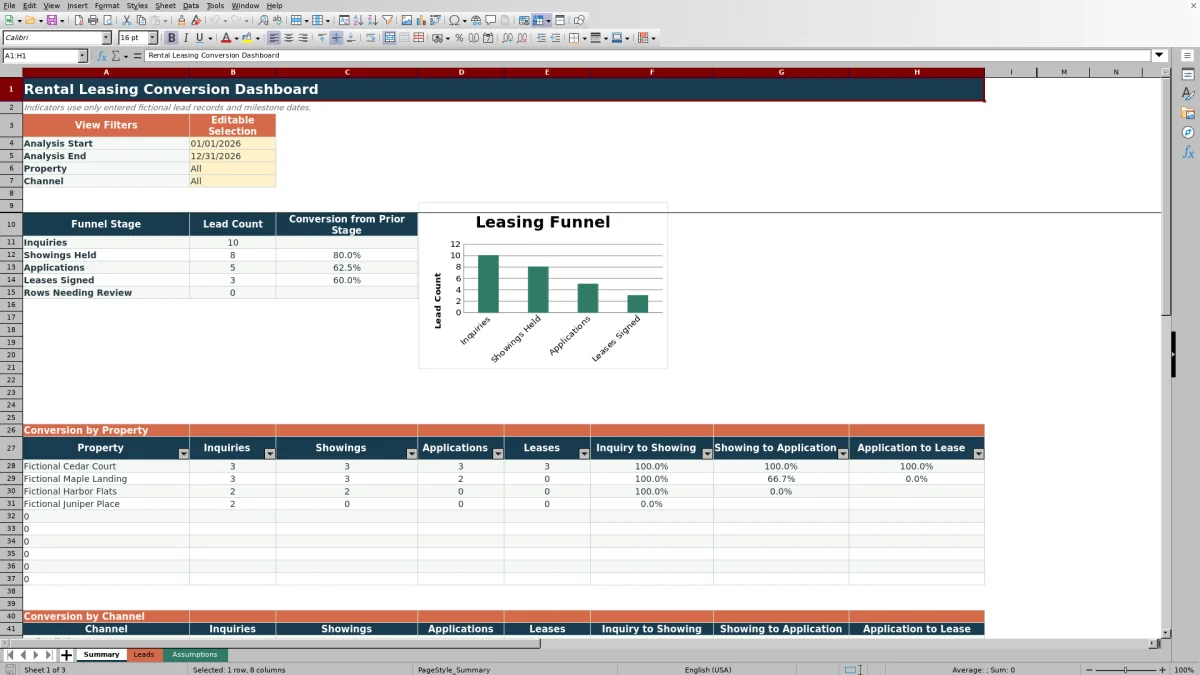
On the Summary sheet, select an analysis start date, analysis end date, property, and channel. Review stage counts, prior-stage conversion rates, the funnel chart, and the property and channel breakdowns.
What the rental leasing conversion dashboard measures
The dashboard follows four stages: inquiry, showing held, application, and lease signed. It reports lead counts and three stage conversion rates: inquiry to showing, showing to application, and application to lease.
Summary filters apply the selected inquiry-date range, property, and channel. Property and channel sections then show the same funnel from two operational perspectives.
Workbook structure and data flow
The Leads sheet is the input source. Each record can include a lead ID, property, unit, inquiry date, channel, showing date, application date, lease date, responsibility, and status. The conversion calculations use the presence of milestone dates to place records in later funnel stages.
The Summary sheet reads those entries and applies the selected filters. The Assumptions sheet supplies editable dropdown choices and the earliest and latest accepted dates used by validation.
Worked rental leasing scenario
Suppose four fictional online-listing inquiries for Fictional Cedar Court have inquiry dates inside the selected period. Three records have showing dates, two of those records have application dates, and one has a lease-signed date.
The filtered Summary shows four inquiries, three showings, two applications, and one lease. Inquiry-to-showing conversion is 75.0%, showing-to-application conversion is 66.7%, and application-to-lease conversion is 50.0%.
The result indicates that application-to-lease is the lowest percentage in this small example. The next decision could be to inspect the open application record, confirm its current status and responsibility, and gather more records before changing the leasing process.
Common errors and solutions
The Funnel Check formulas identify several data conditions that can affect interpretation. The Summary sheet also counts populated records included under Rows Needing Review.
- If a duplicate lead ID is flagged, assign a unique identifier to each separate inquiry.
- If required inputs are missing, complete the property, inquiry date, channel, responsibility, and status fields.
- If milestone dates are flagged, confirm that the showing is not before the inquiry, the application is not before or without a showing, and the lease is not before or without an application.
- If lease information and status are inconsistent, align the lease-signed date and status with the recorded outcome.
- If a date is rejected during entry, check the earliest and latest accepted dates on the Assumptions sheet.
Workbook and blank spreadsheet comparison
Use the prepared workbook when its verified fields and calculations fit the task. Start with a blank spreadsheet when you need to design a different model and can build and test every field and formula yourself.
| Method | Setup | Calculations and review | Practical fit |
|---|---|---|---|
| This Excel workbook | Use the prepared structure in the validated file | Review the documented calculations and results | Local editable workflow supported by the workbook |
| Blank spreadsheet | Create the structure yourself | Build and test every formula and check | A custom model built from scratch |
Workbook limits and interpretation boundaries
The prepared Leads range contains 100 lead rows, from row 4 through row 103. Extending the workbook beyond that range requires corresponding changes to formulas, validation ranges, and Summary calculations.
Indicators use only entered lead records and milestone dates, and the funnel checks do not verify information against outside records. The analysis period is applied to Inquiry Date; later milestone counts are based on whether the applicable date is present for an included inquiry, not whether that milestone itself falls inside the selected period.
Using property and channel results
The property breakdown helps compare configured communities using both stage counts and conversion percentages. The channel breakdown applies the same measures to sources such as online listings, resident referrals, property signs, social media, and walk-ins.
Read percentages together with their counts. A channel with one inquiry and one lease displays a different operating context from a channel with many inquiries, even if both show a high conversion rate. Use the filtered results to decide which records, properties, or channels need closer operational attention.
Frequently asked questions
What conversions does the Excel dashboard calculate?
It calculates inquiry-to-showing, showing-to-application, and application-to-lease conversion. Each percentage compares a funnel stage with the immediately preceding stage.
How do the Summary filters work?
The Summary sheet filters records by the selected inquiry-date range, property, and channel. Selecting All for property or channel includes every configured value that otherwise meets the date criteria.
Do lead statuses determine the funnel counts?
The stage counts use entered records and nonblank milestone dates: showing held, application, and lease signed. Status is retained as a lead field and is also used by the Funnel Check formula to identify inconsistent lease information.
What does Rows Needing Review mean?
It counts populated lead rows with a Funnel Check message, such as a duplicate ID, missing required input, out-of-order milestone date, missing lease date for a leased status, or inconsistent lease information.
Can the workbook hold more than 100 lead records?
The prepared input range supports 100 records in rows 4 through 103. Adding more records requires extending the lead formulas, dropdown and date-validation ranges, and Summary calculation ranges.
Editorial responsibility

Marcus ReedLeasing and property workflows

Elena BrooksWorkbook logic and financial operations