This tenant notice delivery log Excel workbook organizes manager-prepared notice records by property, unit, tenancy label, notice type, preparation date, delivery method, delivery or attempt date, evidence description, responsibility, follow-up date, and status.
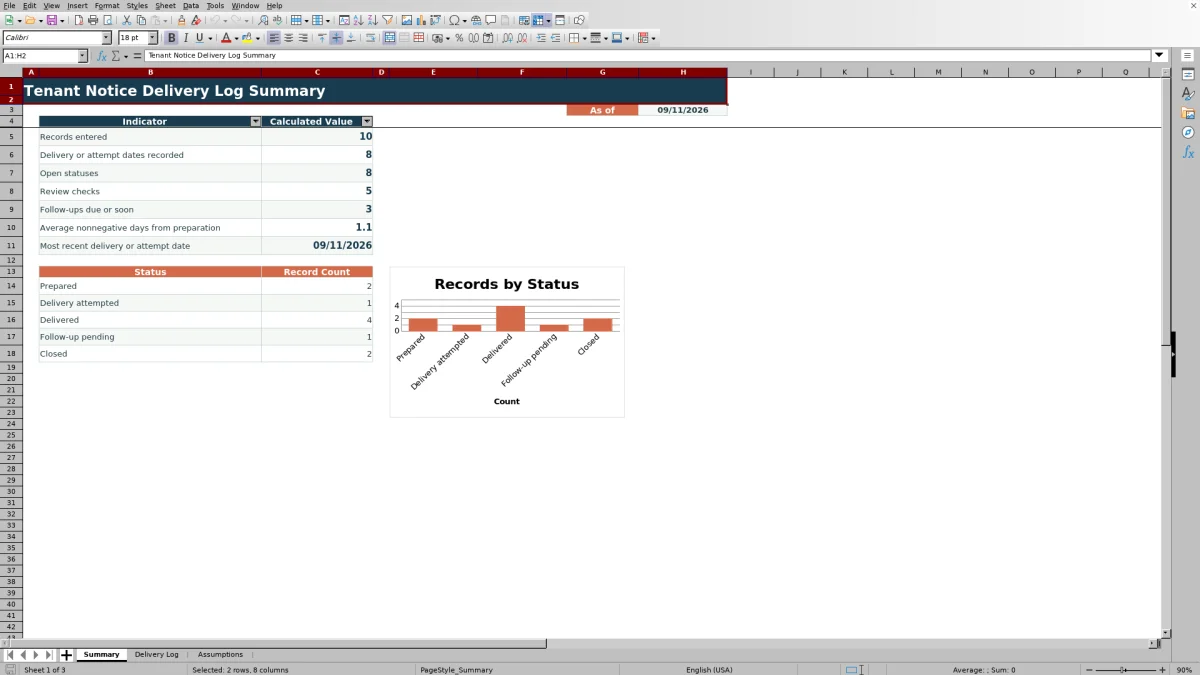
The XLSX includes a 100-row delivery log, configurable lists, date validation, calculated timing, review alerts, summary indicators, and a status chart. It records notice activity without creating legal notices or determining whether a delivery method is valid or compliant.
How this workbook can help
- Maintains a consistent 15-column record for up to 100 notice entries.
- Flags duplicate IDs, missing core fields, date-order issues, and missing delivery details through formula-based prompts.
- Summarizes record counts, timing, follow-up prompts, and status distribution on one sheet.
- Allows notice types, delivery methods, responsibility options, statuses, and the due-soon window to be adjusted for internal recordkeeping.
What is in the file
How to get started
1. Configure the lists
Open the Assumptions sheet and adjust the notice types, delivery methods, responsibility options, statuses, or due-soon window. The due-soon setting accepts a whole number from 0 through 30.
2. Replace the sample records
Delete or replace the three fictional examples in rows 5 through 7 of the Delivery Log. Use the yellow entry cells and keep the formulas in the Days from Preparation and Review Alert columns.
3. Enter each notice record
Assign a unique Notice ID and complete the property, unit, tenancy label, notice type, prepared date, responsibility, and status. Add the delivery method, delivery or attempt date, provider, evidence description, and follow-up date when applicable.
4. Monitor alerts and summary results
Use the Review Alert column to identify records with configured issues. Filter the log as needed, then consult the Summary sheet for activity counts, timing indicators, follow-up prompts, and status totals.
What the Tenant Notice Delivery Log Records
The Delivery Log provides 100 preconfigured record rows, with one row intended for each notice record. Its columns capture the Notice ID, property, unit, tenancy label, notice type, prepared date, delivery details, evidence description, follow-up date, responsibility, status, elapsed days, and any review alert.
- Notice details identify the record and rental location.
- Delivery fields document the method, date, and person or vendor involved.
- The evidence field records a description or reference rather than storing an attachment.
- Status and follow-up fields support internal tracking.
Built-In Calculations and Entry Controls
The Assumptions sheet supplies editable dropdown lists for notice types, delivery methods, responsibility options, and statuses. Date validation applies to prepared dates, delivery or attempt dates, and follow-up dates, with accepted dates from January 1, 2000 through December 31, 2100.
When preparation and delivery dates are present, the log calculates the number of days between them. Record formulas also check configured conditions such as duplicate IDs, missing core fields, reversed dates, and incomplete delivery details. Summary formulas count activity, alerts, follow-ups, and statuses.
Worked Scenario for a Fictional Notice Record
Input: A fictional manager enters Notice ID SAMPLE-N-010 for Fictional Maple House, unit FIC-12. The record uses a prepared date of 09/10/2026, hand delivery on 09/12/2026, an evidence reference, assigned responsibility, and the Delivered status.
Result: Days from Preparation displays 2. If the Notice ID is unique, the core fields are complete, and no other configured condition applies, the Review Alert cell remains blank.
Interpretation: The result shows that the entered delivery date is two days after the entered preparation date. It documents the chronology but does not establish delivery validity or compliance.
Next decision: The manager can retain the Delivered status while work remains open or change it to Closed after the internal recordkeeping process is complete.
Common Entry Errors and Solutions
The Review Alert column provides a direct prompt for several common data issues.
- For a duplicate ID prompt, assign a unique Notice ID or correct the unintended duplicate.
- For a missing core field prompt, complete the property, unit, tenancy label, notice type, prepared date, responsibility, or status.
- For a date-order prompt, verify and correct a delivery date entered before the prepared date.
- For an add delivery date prompt, enter the date or correct a status that was selected prematurely.
- For an add delivery method prompt, select the method associated with the recorded delivery or attempt date.
- For a follow-up prompt, check the follow-up date and update the record after the related action is documented.
Workbook and blank spreadsheet comparison
Use the prepared workbook when its verified fields and calculations fit the task. Start with a blank spreadsheet when you need to design a different model and can build and test every field and formula yourself.
| Method | Setup | Calculations and review | Practical fit |
|---|---|---|---|
| This Excel workbook | Use the prepared structure in the validated file | Review the documented calculations and results | Local editable workflow supported by the workbook |
| Blank spreadsheet | Create the structure yourself | Build and test every formula and check | A custom model built from scratch |
Workbook Limits and Appropriate Use
This workbook is for recordkeeping only. It does not draft or issue a notice, select a legally permitted delivery method, calculate a statutory deadline, or determine whether notice content or delivery is compliant.
- The configured log contains 100 entry rows, from row 5 through row 104.
- The evidence field stores a description or reference, not the underlying evidence file.
- Review alerts reflect the workbook's formulas and cannot evaluate facts outside the entered data.
- The workbook includes fictional sample records that should be replaced before operational use.
Understanding Summary Counts and Statuses
The Summary sheet counts records using the Notice ID column and counts delivery or attempt dates from the corresponding date column. It also reports review checks, follow-ups due or soon, average nonnegative days from preparation, and the most recent delivery or attempt date.
The open-status indicator counts the first four configured statuses: Prepared, Delivery attempted, Delivered, and Follow-up pending. Closed is reported separately in the status totals and chart. If the status list is changed or reordered, the summary should be checked to confirm that the resulting categories still match the intended internal workflow.
Frequently asked questions
Does this Excel workbook create tenant notices?
No. It records information about manager-prepared notices and their delivery or attempted delivery. It does not generate notice language or determine applicable notice requirements.
Which fields are treated as core fields by the review formula?
After a Notice ID is entered, the formula checks the property, unit, tenancy label, notice type, prepared date, responsibility, and status fields. A missing value in one of those fields produces a missing core field prompt.
Can the dropdown choices be customized?
Yes. The Assumptions sheet contains editable lists for notice types, delivery methods, responsibility options, and statuses. The Delivery Log dropdowns reference those lists through row 104.
How does the due-soon follow-up setting work?
The Assumptions sheet contains a Due-soon window setting with a default value of 3 days and an allowed range of 0 through 30. Follow-up alerts and the related Summary count use the configured workbook setting.
Can evidence files be stored in the delivery log?
The workbook provides an Evidence Description field for a description, file name, reference number, or storage reference. The manifest does not include a dedicated attachment repository, so supporting files should be maintained separately under the property's established recordkeeping process.
Editorial responsibility

Marcus ReedLeasing and property workflows

Elena BrooksWorkbook logic and financial operations